
browserbase/stagehand
The SDK to extract data and interact with any site on the web. Get started with Claude Code, Codex, Eve, Mastra, and more.
Build with Backblaze B2
SDKs, agent skills, IDE extensions, and reference pipelines from Backblaze Labs. All open source.
Loading star history...
Use Cases & Benefits
- Provides an AI-powered browser automation framework combining code and natural language for flexible web interactions.
- Enables developers to seamlessly mix precise code with AI-driven navigation, improving reliability and control over browser automation.
- Use for automating complex web workflows where some page elements are unknown or dynamic, leveraging AI to adapt actions.
- Use for integrating state-of-the-art language models into browser tasks with minimal code to enhance automation intelligence.
- Use for previewing and caching repeatable browser actions to optimize performance and reduce API usage in production.
About stagehand

The AI Browser Automation Framework
Read the Docs


If you're looking for the Python implementation, you can find it here

Why Stagehand?
Most existing browser automation tools either require you to write low-level code in a framework like Selenium, Playwright, or Puppeteer, or use high-level agents that can be unpredictable in production. By letting developers choose what to write in code vs. natural language, Stagehand is the natural choice for browser automations in production.
-
Choose when to write code vs. natural language: use AI when you want to navigate unfamiliar pages, and use code (Playwright) when you know exactly what you want to do.
-
Preview and cache actions: Stagehand lets you preview AI actions before running them, and also helps you easily cache repeatable actions to save time and tokens.
-
Computer use models with one line of code: Stagehand lets you integrate SOTA computer use models from OpenAI and Anthropic into the browser with one line of code.
Example
Here's how to build a sample browser automation with Stagehand:
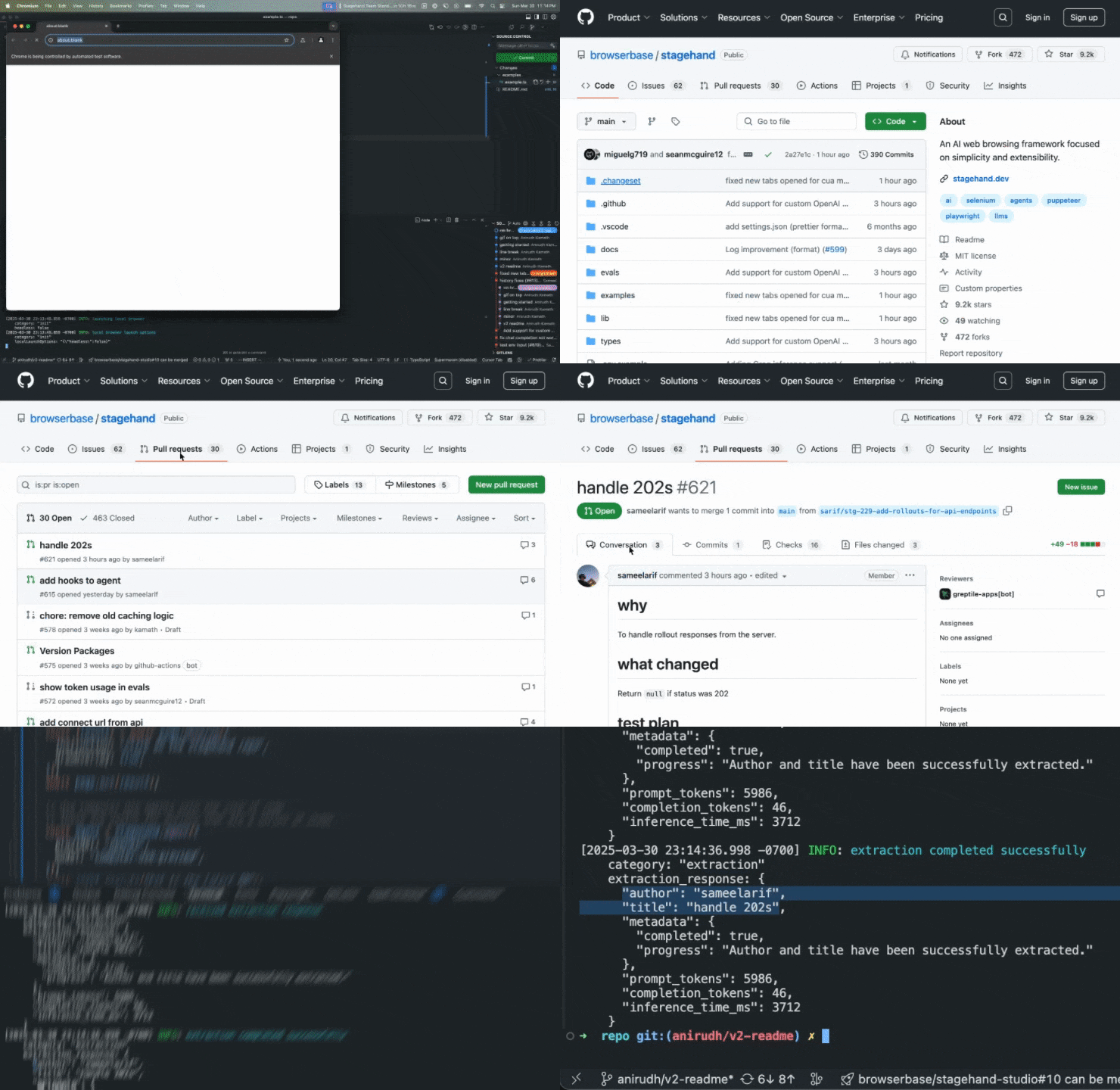
// Use Playwright functions on the page object
const page = stagehand.page;
await page.goto("https://github.com/browserbase");

// Use act() to execute individual actions
await page.act("click on the stagehand repo");

// Use Computer Use agents for larger actions
const agent = stagehand.agent({
    provider: "openai",
    model: "computer-use-preview",
});
await agent.execute("Get to the latest PR");

// Use extract() to read data from the page
const { author, title } = await page.extract({
  instruction: "extract the author and title of the PR",
  schema: z.object({
    author: z.string().describe("The username of the PR author"),
    title: z.string().describe("The title of the PR"),
  }),
});
Documentation
Visit docs.stagehand.dev to view the full documentation.
Getting Started
Start with Stagehand with one line of code, or check out our Quickstart Guide for more information:
npx create-browser-app

Build and Run from Source
git clone https://github.com/browserbase/stagehand.git
cd stagehand
pnpm install
pnpm playwright install
pnpm run build
pnpm run example # run the blank script at ./examples/example.ts
pnpm run example 2048 # run the 2048 example at ./examples/2048.ts
pnpm run evals -man # see evaluation suite options
Stagehand is best when you have an API key for an LLM provider and Browserbase credentials. To add these to your project, run:
cp .env.example .env
nano .env # Edit the .env file to add API keys
Contributing
[!NOTE]
We highly value contributions to Stagehand! For questions or support, please join our Slack community.
At a high level, we're focused on improving reliability, speed, and cost in that order of priority. If you're interested in contributing, we strongly recommend reaching out to Miguel Gonzalez or Paul Klein in our Slack community before starting to ensure that your contribution aligns with our goals.
For more information, please see our Contributing Guide.
Acknowledgements
This project heavily relies on Playwright as a resilient backbone to automate the web. It also would not be possible without the awesome techniques and discoveries made by tarsier, gemini-zod, and fuji-web.
We'd like to thank the following people for their major contributions to Stagehand:
- Paul Klein
- Anirudh Kamath
- Sean McGuire
- Miguel Gonzalez
- Sameel Arif
- Filip Michalsky
- Jeremy Press
- Navid Pour
License
Licensed under the MIT License.
Copyright 2025 Browserbase, Inc.
Discover Repositories
Search across tracked repositories by name or description