
subframe7536/maple-font
Maple Mono: Open source monospace font with round corner, ligatures and Nerd-Font icons for IDE and terminal, fine-grained customization options. 带连字和控制台图标的圆角等宽字体,中英文宽度完美2:1,细粒度的自定义选项
Build with Backblaze B2
SDKs, agent skills, IDE extensions, and reference pipelines from Backblaze Labs. All open source.
Loading star history...
Use Cases & Benefits
- Provides an open source monospace font with rounded corners, programming ligatures, and Nerd-Font icons optimized for IDEs and terminals.
- Offers fine-grained customization including variable font weights, smart ligatures, and multilingual support with perfect 2:1 Chinese-English width alignment.
- Use for developers seeking a visually smooth and customizable coding font with extensive ligature and icon support for enhanced readability.
- Use for multilingual programming environments requiring consistent alignment and display of Chinese, Japanese, and English characters.
- Use for font designers or enthusiasts who want to build or customize their own monospace fonts using provided source files and build scripts.
About maple-font







Download | Website | English | 中文 | 日本語
Maple Mono
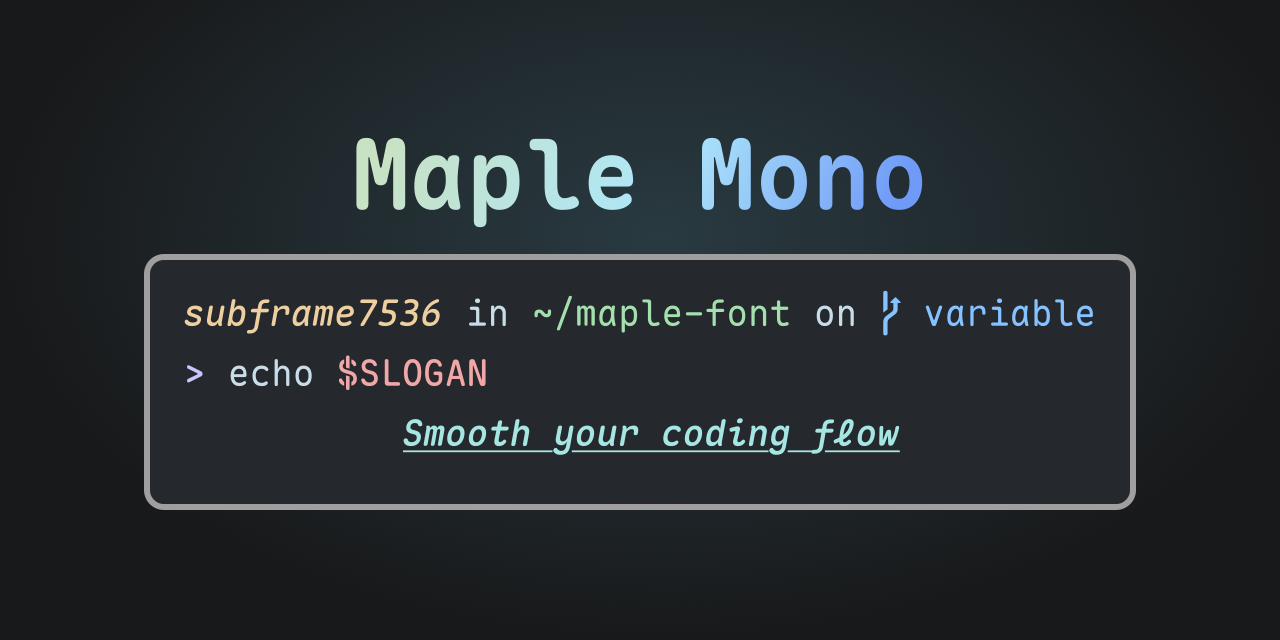
Maple Mono is an open source monospace font focused on smoothing your coding flow.
I create it to enhance my working experience, and hope that it can be useful to others.
V7 is a completely remade version, providing variable font format and source files of font project, redesigning more than half of the glyphs and offering smarter ligatures. You can checkout V6 here
Features
- ✨ Variable - Infinity font weights with fine-grained italic glyphs.
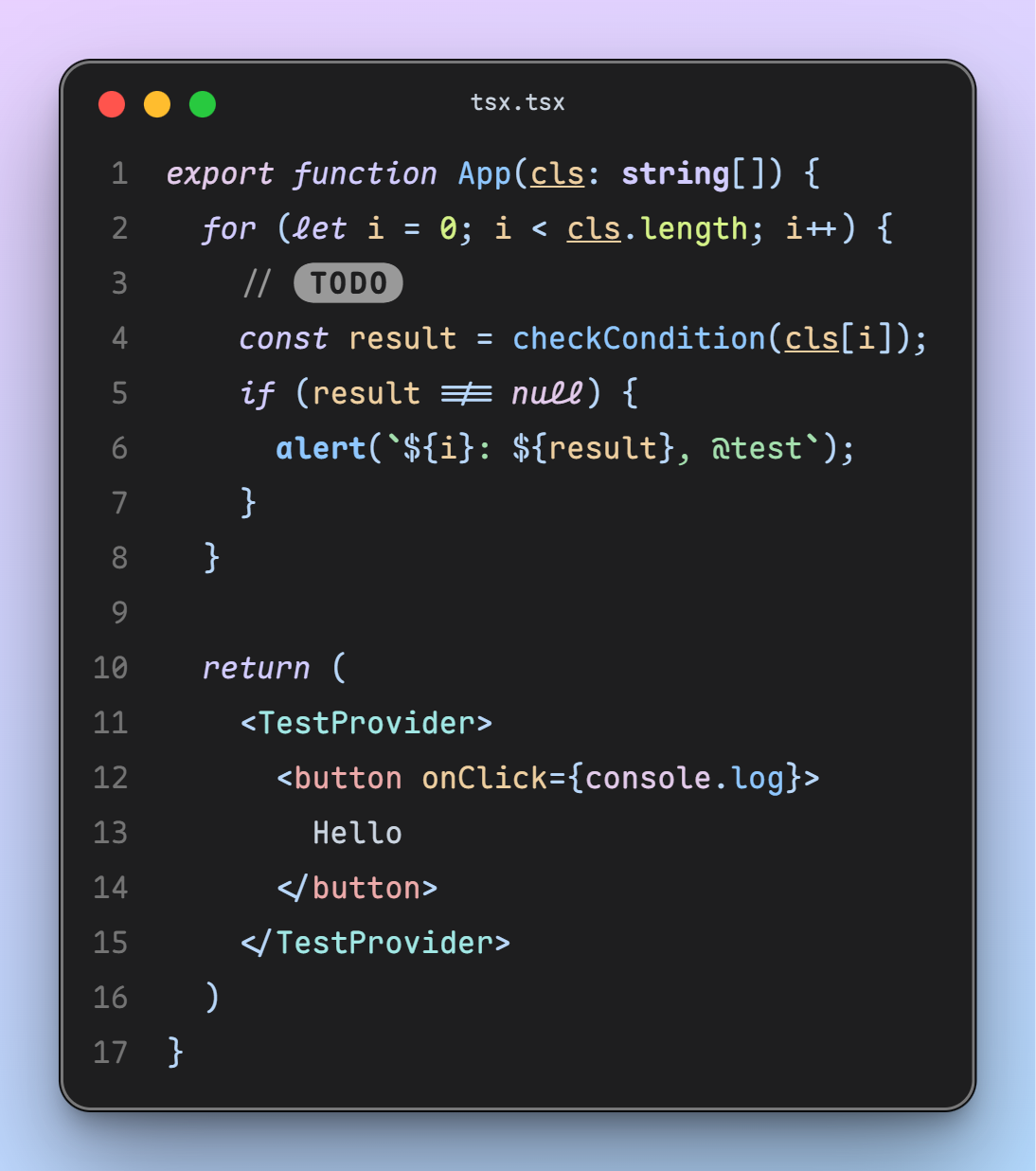
- ☁️ Smooth - Round corner, brand-new glyph of
@ $ % & Q ->and cursivef i j k l x yin italic style. - 💪 Useful - Large amount of smart ligatures, see in
features/ - 🎨 Icon - First-Class Nerd-Font support, make your terminal more vivid.
- 🔨 Customize - Enable or disable font features as you want, just make your own font.
Simpified Chinese, Traditional Chinese and Japanese
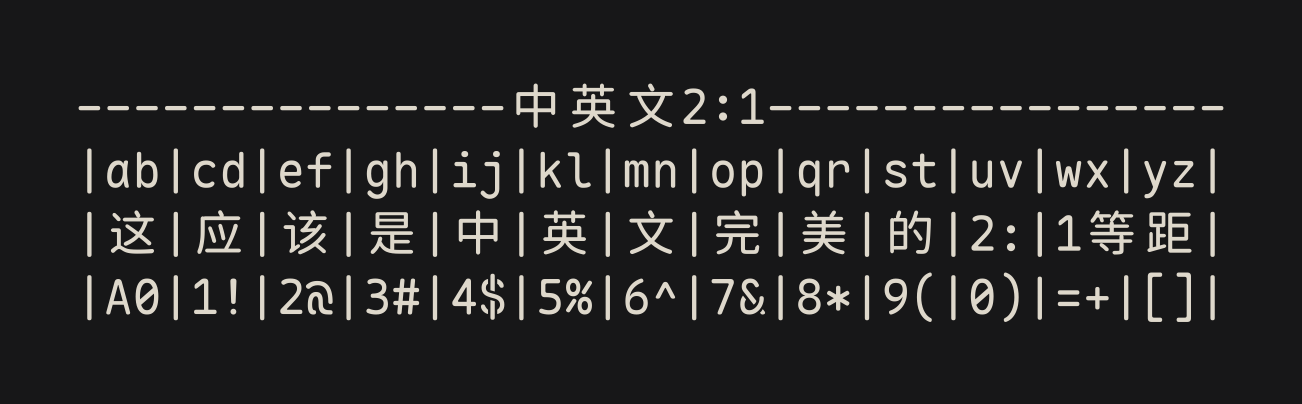
CN version based on Resource Han Rounded provides complete character set support for Chinese development environments, including Simplified Chinese, Traditional Chinese, and Japanese. Meanwhile, the characteristic of perfect 2:1 alignment between Chinese and English allows this font to achieve a neat, uniform, beautiful, and comfortable appearance in scenarios such as multilingual display and Markdown tables. However, the spacing of Chinese characters is larger compared to other popular Chinese fonts. See details in release notes and this issue.
ScreenShots
Download
You can download all the font archives from Releases.
Scoop (Windows)
# Add bucket
scoop bucket add nerd-fonts
# Maple Mono (ttf format)
scoop install Maple-Mono
# Maple Mono NF
scoop install Maple-Mono-NF
# Maple Mono NF CN
scoop install Maple-Mono-NF-CN
All packages (Click to expand)
# Add bucket
scoop bucket add nerd-fonts
# Maple Mono (ttf format)
scoop install Maple-Mono
# Maple Mono (hinted ttf format)
scoop install Maple-Mono-autohint
# Maple Mono (otf format)
scoop install Maple-Mono-otf
# Maple Mono NF
scoop install Maple-Mono-NF
# Maple Mono NF CN
scoop install Maple-Mono-NF-CN
Homebrew (MacOS, Linux)
# Maple Mono
brew install --cask font-maple-mono
# Maple Mono NF
brew install --cask font-maple-mono-nf
# Maple Mono NF CN
brew install --cask font-maple-mono-nf-cn
All packages (Click to expand)
# Maple Mono
brew install --cask font-maple-mono
# Maple Mono NF
brew install --cask font-maple-mono-nf
# Maple Mono CN
brew install --cask font-maple-mono-cn
# Maple Mono NF CN
brew install --cask font-maple-mono-nf-cn

# Maple Mono Normal
brew install --cask font-maple-mono-normal
# Maple Mono Normal NF
brew install --cask font-maple-mono-normal-nf
# Maple Mono Normal CN
brew install --cask font-maple-mono-normal-cn
# Maple Mono Normal NF CN
brew install --cask font-maple-mono-normal-nf-cn
Arch Linux
ArchLinuxCN repository allows downloading a single package zip file without downloading all the package zip files in pkgbase, but AUR does not. (If you have a good solution, please contact Cyberczy([email protected]))
ArchLinuxCN (Recommended)
# Maple Mono (Ligature TTF unhinted)
paru -S ttf-maplemono
# Maple Mono NF (Ligature unhinted)
paru -S ttf-maplemono-nf-unhinted
# Maple Mono NF CN (Ligature unhinted)
paru -S ttf-maplemono-nf-cn-unhinted
All packages (Click to expand)
# Maple Mono (Ligature Variable)
paru -S ttf-maplemono-variable
# Maple Mono (Ligature TTF hinted)
paru -S ttf-maplemono-autohint
# Maple Mono (Ligature TTF unhinted)
paru -S ttf-maplemono
# Maple Mono (Ligature OTF)
paru -S otf-maplemono
# Maple Mono (Ligature WOFF2)
paru -S woff2-maplemono
# Maple Mono NF (Ligature hinted)
paru -S ttf-maplemono-nf
# Maple Mono NF (Ligature unhinted)
paru -S ttf-maplemono-nf-unhinted
# Maple Mono CN (Ligature hinted)
paru -S ttf-maplemono-cn
# Maple Mono CN (Ligature unhinted)
paru -S ttf-maplemono-cn-unhinted
# Maple Mono NF CN (Ligature hinted)
paru -S ttf-maplemono-nf-cn
# Maple Mono NF CN (Ligature unhinted)
paru -S ttf-maplemono-nf-cn-unhinted

# Maple Mono (No-Ligature Variable)
paru -S ttf-maplemononl-variable
# Maple Mono (No-Ligature TTF hinted)
paru -S ttf-maplemononl-autohint
# Maple Mono (No-Ligature TTF unhinted)
paru -S ttf-maplemononl
# Maple Mono (No-Ligature OTF)
paru -S otf-maplemononl
# Maple Mono (No-Ligature WOFF2)
paru -S woff2-maplemononl
# Maple Mono NF (No-Ligature hinted)
paru -S ttf-maplemononl-nf
# Maple Mono NF (No-Ligature unhinted)
paru -S ttf-maplemononl-nf-unhinted
# Maple Mono CN (No-Ligature hinted)
paru -S ttf-maplemononl-cn
# Maple Mono CN (No-Ligature unhinted)
paru -S ttf-maplemononl-cn-unhinted
# Maple Mono NF CN (No-Ligature hinted)
paru -S ttf-maplemononl-nf-cn
# Maple Mono NF CN (No-Ligature unhinted)
paru -S ttf-maplemononl-nf-cn-unhinted

# Maple Mono Normal (Ligature Variable)
paru -S ttf-maplemononormal-variable
# Maple Mono Normal (Ligature TTF hinted)
paru -S ttf-maplemononormal-autohint
# Maple Mono Normal (Ligature TTF unhinted)
paru -S ttf-maplemononormal
# Maple Mono Normal (Ligature OTF)
paru -S otf-maplemononormal
# Maple Mono Normal (Ligature WOFF2)
paru -S woff2-maplemononormal
# Maple Mono Normal NF (Ligature hinted)
paru -S ttf-maplemononormal-nf
# Maple Mono Normal NF (Ligature unhinted)
paru -S ttf-maplemononormal-nf-unhinted
# Maple Mono Normal CN (Ligature hinted)
paru -S ttf-maplemononormal-cn
# Maple Mono Normal CN (Ligature unhinted)
paru -S ttf-maplemononormal-cn-unhinted
# Maple Mono Normal NF CN (Ligature hinted)
paru -S ttf-maplemononormal-nf-cn
# Maple Mono Normal NF CN (Ligature unhinted)
paru -S ttf-maplemononormal-nf-cn-unhinted

# Maple Mono Normal (No-Ligature Variable)
paru -S ttf-maplemononormalnl-variable
# Maple Mono Normal (No-Ligature TTF hinted)
paru -S ttf-maplemononormalnl-autohint
# Maple Mono Normal (No-Ligature TTF unhinted)
paru -S ttf-maplemononormalnl
# Maple Mono Normal (No-Ligature OTF)
paru -S otf-maplemononormalnl
# Maple Mono Normal (No-Ligature WOFF2)
paru -S woff2-maplemononormalnl
# Maple Mono Normal NF (No-Ligature hinted)
paru -S ttf-maplemononormalnl-nf
# Maple Mono Normal NF (No-Ligature unhinted)
paru -S ttf-maplemononormalnl-nf-unhinted
# Maple Mono Normal CN (No-Ligature hinted)
paru -S ttf-maplemononormalnl-cn
# Maple Mono Normal CN (No-Ligature unhinted)
paru -S ttf-maplemononormalnl-cn-unhinted
# Maple Mono Normal NF CN (No-Ligature hinted)
paru -S ttf-maplemononormalnl-nf-cn
# Maple Mono Normal NF CN (No-Ligature unhinted)
paru -S ttf-maplemononormalnl-nf-cn-unhinted
AUR (Not Recommended)
# Maple Mono (Ligature TTF unhinted)
paru -S maplemono-ttf
# Maple Mono NF (Ligature unhinted)
paru -S maplemono-nf-unhinted
# Maple Mono NF CN (Ligature unhinted)
paru -S maplemono-nf-cn-unhinted
All packages (Click to expand)
# Maple Mono (Ligature Variable)
paru -S maplemono-variable
# Maple Mono (Ligature TTF hinted)
paru -S maplemono-ttf-autohint
# Maple Mono (Ligature TTF unhinted)
paru -S maplemono-ttf
# Maple Mono (Ligature OTF)
paru -S maplemono-otf
# Maple Mono (Ligature WOFF2)
paru -S maplemono-woff2
# Maple Mono NF (Ligature hinted)
paru -S maplemono-nf
# Maple Mono NF (Ligature unhinted)
paru -S maplemono-nf-unhinted
# Maple Mono CN (Ligature hinted)
paru -S maplemono-cn
# Maple Mono CN (Ligature unhinted)
paru -S maplemono-cn-unhinted
# Maple Mono NF CN (Ligature hinted)
paru -S maplemono-nf-cn
# Maple Mono NF CN (Ligature unhinted)
paru -S maplemono-nf-cn-unhinted

# Maple Mono (No-Ligature Variable)
paru -S maplemononl-variable
# Maple Mono (No-Ligature TTF hinted)
paru -S maplemononl-ttf-autohint
# Maple Mono (No-Ligature TTF unhinted)
paru -S maplemononl-ttf
# Maple Mono (No-Ligature OTF)
paru -S maplemononl-otf
# Maple Mono (No-Ligature WOFF2)
paru -S maplemononl-woff2
# Maple Mono NF (No-Ligature hinted)
paru -S maplemononl-nf
# Maple Mono NF (No-Ligature unhinted)
paru -S maplemononl-nf-unhinted
# Maple Mono CN (No-Ligature hinted)
paru -S maplemononl-cn
# Maple Mono CN (No-Ligature unhinted)
paru -S maplemononl-cn-unhinted
# Maple Mono NF CN (No-Ligature hinted)
paru -S maplemononl-nf-cn
# Maple Mono NF CN (No-Ligature unhinted)
paru -S maplemononl-nf-cn-unhinted

# Maple Mono Normal (Ligature Variable)
paru -S maplemononormal-variable
# Maple Mono Normal (Ligature TTF hinted)
paru -S maplemononormal-ttf-autohint
# Maple Mono Normal (Ligature TTF unhinted)
paru -S maplemononormal-ttf
# Maple Mono Normal (Ligature OTF)
paru -S maplemononormal-otf
# Maple Mono Normal (Ligature WOFF2)
paru -S maplemononormal-woff2
# Maple Mono Normal NF (Ligature hinted)
paru -S maplemononormal-nf
# Maple Mono Normal NF (Ligature unhinted)
paru -S maplemononormal-nf-unhinted
# Maple Mono Normal CN (Ligature hinted)
paru -S maplemononormal-cn
# Maple Mono Normal CN (Ligature unhinted)
paru -S maplemononormal-cn-unhinted
# Maple Mono Normal NF CN (Ligature hinted)
paru -S maplemononormal-nf-cn
# Maple Mono Normal NF CN (Ligature unhinted)
paru -S maplemononormal-nf-cn-unhinted

# Maple Mono Normal (No-Ligature Variable)
paru -S maplemononormalnl-variable
# Maple Mono Normal (No-Ligature TTF hinted)
paru -S maplemononormalnl-ttf-autohint
# Maple Mono Normal (No-Ligature TTF unhinted)
paru -S maplemononormalnl-ttf
# Maple Mono Normal (No-Ligature OTF)
paru -S maplemononormalnl-otf
# Maple Mono Normal (No-Ligature WOFF2)
paru -S maplemononormalnl-woff2
# Maple Mono Normal NF (No-Ligature hinted)
paru -S maplemononormalnl-nf
# Maple Mono Normal NF (No-Ligature unhinted)
paru -S maplemononormalnl-nf-unhinted
# Maple Mono Normal CN (No-Ligature hinted)
paru -S maplemononormalnl-cn
# Maple Mono Normal CN (No-Ligature unhinted)
paru -S maplemononormalnl-cn-unhinted
# Maple Mono Normal NF CN (No-Ligature hinted)
paru -S maplemononormalnl-nf-cn
# Maple Mono Normal NF CN (No-Ligature unhinted)
paru -S maplemononormalnl-nf-cn-unhinted
Nixpkgs (NixOS, Linux, MacOS)
fonts.packages = with pkgs; [
  # Maple Mono (Ligature TTF unhinted)
  maple-mono.truetype
  # Maple Mono NF (Ligature unhinted)
  maple-mono.NF-unhinted
  # Maple Mono NF CN (Ligature unhinted)
  maple-mono.NF-CN-unhinted
];
All packages (Click to expand)
fonts.packages = with pkgs; [
  # Maple Mono (Ligature Variable)
  maple-mono.variable
  # Maple Mono (Ligature TTF hinted)
  maple-mono.truetype-autohint
  # Maple Mono (Ligature TTF unhinted)
  maple-mono.truetype
  # Maple Mono (Ligature OTF)
  maple-mono.opentype
  # Maple Mono (Ligature WOFF2)
  maple-mono.woff2
  # Maple Mono NF (Ligature hinted)
  maple-mono.NF
  # Maple Mono NF (Ligature unhinted)
  maple-mono.NF-unhinted
  # Maple Mono CN (Ligature hinted)
  maple-mono.CN
  # Maple Mono CN (Ligature unhinted)
  maple-mono.CN-unhinted
  # Maple Mono NF CN (Ligature hinted)
  maple-mono.NF-CN
  # Maple Mono NF CN (Ligature unhinted)
  maple-mono.NF-CN-unhinted

  # Maple Mono (No-Ligature Variable)
  maple-mono.NL-Variable
  # Maple Mono (No-Ligature TTF hinted)
  maple-mono.NL-TTF-AutoHint
  # Maple Mono (No-Ligature TTF unhinted)
  maple-mono.NL-TTF
  # Maple Mono (No-Ligature OTF)
  maple-mono.NL-OTF
  # Maple Mono (No-Ligature WOFF2)
  maple-mono.NL-Woff2
  # Maple Mono NF (No-Ligature hinted)
  maple-mono.NL-NF
  # Maple Mono NF (No-Ligature unhinted)
  maple-mono.NL-NF-unhinted
  # Maple Mono CN (No-Ligature hinted)
  maple-mono.NL-CN
  # Maple Mono CN (No-Ligature unhinted)
  maple-mono.NL-CN-unhinted
  # Maple Mono NF CN (No-Ligature hinted)
  maple-mono.NL-NF-CN
  # Maple Mono NF CN (No-Ligature unhinted)
  maple-mono.NL-NF-CN-unhinted

  # Maple Mono Normal (Ligature Variable)
  maple-mono.Normal-Variable
  # Maple Mono Normal (Ligature TTF hinted)
  maple-mono.Normal-TTF-AutoHint
  # Maple Mono Normal (Ligature TTF unhinted)
  maple-mono.Normal-TTF
  # Maple Mono Normal (Ligature OTF)
  maple-mono.Normal-OTF
  # Maple Mono Normal (Ligature WOFF2)
  maple-mono.Normal-Woff2
  # Maple Mono Normal NF (Ligature hinted)
  maple-mono.Normal-NF
  # Maple Mono Normal NF (Ligature unhinted)
  maple-mono.Normal-NF-unhinted
  # Maple Mono Normal CN (Ligature hinted)
  maple-mono.Normal-CN
  # Maple Mono Normal CN (Ligature unhinted)
  maple-mono.Normal-CN-unhinted
  # Maple Mono Normal NF CN (Ligature hinted)
  maple-mono.Normal-NF-CN
  # Maple Mono Normal NF CN (Ligature unhinted)
  maple-mono.Normal-NF-CN-unhinted

  # Maple Mono Normal (No-Ligature Variable)
  maple-mono.NormalNL-Variable
  # Maple Mono Normal (No-Ligature TTF hinted)
  maple-mono.NormalNL-TTF-AutoHint
  # Maple Mono Normal (No-Ligature TTF unhinted)
  maple-mono.NormalNL-TTF
  # Maple Mono Normal (No-Ligature OTF)
  maple-mono.NormalNL-OTF
  # Maple Mono Normal (No-Ligature WOFF2)
  maple-mono.NormalNL-Woff2
  # Maple Mono Normal NF (No-Ligature hinted)
  maple-mono.NormalNL-NF
  # Maple Mono Normal NF (No-Ligature unhinted)
  maple-mono.NormalNL-NF-unhinted
  # Maple Mono Normal CN (No-Ligature hinted)
  maple-mono.NormalNL-CN
  # Maple Mono Normal CN (No-Ligature unhinted)
  maple-mono.NormalNL-CN-unhinted
  # Maple Mono Normal NF CN (No-Ligature hinted)
  maple-mono.NormalNL-NF-CN
  # Maple Mono Normal NF CN (No-Ligature unhinted)
  maple-mono.NormalNL-NF-CN-unhinted
];
CDN
Maple Mono
Maple Mono CN
Usage & Feature Configurations
See in document or try it in Playground
Naming FAQ
Features
- Ligature: Default version with ligatures (
Maple Mono) - No-Ligature: Default version without ligatures (
Maple Mono NL) - Normal-Ligature:
--normalpreset with ligatures (Maple Mono Normal) - Normal-No-Ligature:
--normalpreset without ligatures (Maple Mono Normal NL)
Format and Glyph Set
- Variable: Minimal version, smoothly change font weight by variable
- TTF: Minimal version, ttf format [Recommend!]
- OTF: Minimal version, otf format
- WOFF2: Minimal version, woff2 format, for small size on web pages
- NF: Nerd-Font patched version, add icons for terminal (With
-NFsuffix) - CN: Chinese version, embed with Chinese and Japanese glyphs (With
-CNsuffix) - NF-CN: Full version, embed with icons, Chinese and Japanese glyphs (With
-NF-CNsuffix)
Font Hint
- Hinted font is used for low resolution screen to have better render effect. From my experience, if your screen resolution is lower or equal than 1080P, it is recommended to use "hinted font". Using "unhinted font" will lead to misalignment or uneven thickness on your text.
- In this case, you can choose
MapleMono-TTF-AutoHint/MapleMono-NF/MapleMono-NF-CN, etc.
- In this case, you can choose
- Unhinted font is used for high resolution screen (e.g. for MacBook). Using "hinted font" will blur your text or make it looks weird.
- In this case, you can choose
MapleMono-OTF/MapleMono-TTF/MapleMono-NF-unhinted/MapleMono-NF-CN-unhinted, etc.
- In this case, you can choose
- Why there exists
-AutoHintand-unhintedsuffix?- for backward compatibility, I keep the original naming scheme.
-AutoHintis only used forTTFformat.
- for backward compatibility, I keep the original naming scheme.
Custom Build
The config.json file is used to configure the build process. Checkout the schema or document for more details.
There also have some command line options for customizing the build process. Cli options have higher priority than options in config.json.
Build In Browser
Go to Playground, and click "Custom Build" button in the bottom left corner
Use Github Actions
You can use Github Actions to build the font.
- Fork the repo
- (Optional) Change the content in
config.json - Go to Actions tab
- Click on
Custom Buildmenu item on the left - Click on
Run workflowbutton with options setup - Wait for the build to finish
- Download the font archives from Releases
Use Docker
git clone https://github.com/subframe7536/maple-font --depth 1 -b variable
docker build -t maple-font .
docker run -v "$(pwd)/fonts:/app/fonts" -e BUILD_ARGS="--normal" maple-font
Local Build
Clone the repo and run on your local machine. Make sure you have python3 and pip installed
git clone https://github.com/subframe7536/maple-font --depth 1 -b variable
pip install -r requirements.txt
python build.py
- For
UbuntuorDebian, maybepython-is-python3is needed as well
If you have trouble installing the dependencies, just create a new GitHub Codespace and run the commands there
Custom Nerd-Font
If you want to get fixed width icons, setup "nerd_font.mono": true in config.json or add --nf-mono flag to build script args.
If you want to get variable width icons, setup "nerd_font.propo": true in config.json or add --nf-propo flag to build script args.
For custom font-patcher args, font-forge (and maybe python3-fontforge as well) is required.
Maybe you should also change "nerd_font.extra_args" in config.json
Default args: -l --careful --outputdir dir
- if
"nerd_font.propo"istrue, then add--variable-width-glyphs - else if
"nerd_font.mono"istrue, then add--mono
Preset
Run build.py with --normal flag, make the font looks not such "Opinioned" , just like JetBrains Mono (with slashed zero).
If you are using variable font (NOT recommended), please enable calt to make all features work.
Enabled features:
cv01, cv02, cv33, cv34, cv35, cv36, cv61, cv62, ss05, ss06, ss07, ss08
Font Feature Freeze
There are three kinds of options for feature freeze (Why):
enable: Forcely enable the features without setting upcvXX/ssXX/zeroin font features config, just as default glyphs / ligaturesdisable: Remove the features incvXX/ssXX/zero, which will no longer effect, even if you enable it manuallyignore: Do nothing
Custom OpenType Feature
OpenType Feature is used to control the font's built-in variants and ligatures. You can remove some ligatures or features you don't want to, change feature's trigger rule or add some new rules by modifying OpenType Feature.
By default, the Python module in source/py/feature/ will generate feature rule string and load it at build time. You can modify the features or customize tags there.
If you would like to modify the feature file instead, run build.py with --apply-fea-file flag, the feature file from source/features/{regular,italic}.fea will be loaded.
Infinite Arrow Ligatures
Inspired by Fira Code, the font enables infinite arrow ligatures by default from v7.3. For some reason, the ligatures are misaligned when using hinted font, so they are removed in hinted version by default from v7.4. You can setup "keep_infinite_arrow": true in config.json or add --keep-infinite-arrow in cli flag. See more details in #508
Custom Font Weight Mapping
You can modify the static font weight through "weight_mapping" item in config.json.
For example, if you want to make regular font weight a little bit lighter, just decrease the number of "weight_mapping.regular" (from 400 to 350 in this example) :
{
  "weight_mapping": {
    "thin": 100,
    "extralight": 200,
    "light": 300,
    "regular": 350,
    "semibold": 500,
    "medium": 600,
    "bold": 700,
    "extrabold": 800
  }
}
Chinese version
CN version is disabled by default. Run python build.py with --cn flag, the CN base fonts (about 111 MB) will download from GitHub.
If you want to build CN base fonts from variable (about 27 MB), setup "cn.use_static_base_font": false in config.json and BE PATIENT, instantiation will take about 10-30 minutes.
Narrow spacing in CN glyphs
If you think that CN glyphs spacing is TOOOOOO large, there is a build option cn.narrow or cli flag --cn-narrow to narrow spacing in CN glyphs, but this will make the font cannot be recogized as monospaced font.
You can see effect in #249.
GitHub Mirror
The build script will auto download required assets from GitHub. If you have trouble downloading, please setup github_mirror in config.json or $GITHUB to your environment variable. (Target URL will be https://<github_mirror>/<user>/<repo>/releases/download/<tag>/<file>), or just download the target .zip file and put it in the same directory as build.py.
Traditional Chinese Punctuation Support
By enabling cv99, all Chinese punctuation marks will be centred. See more details in #150
Build Script Usage
usage: build.py [-h] [-v] [-d] [--debug] [-n] [--feat FEAT] [--apply-fea-file]
                [--hinted | --no-hinted] [--liga | --no-liga] [--keep-infinite-arrow]
                [--infinite-arrow] [--remove-tag-liga] [--line-height LINE_HEIGHT]
                [--nf-mono] [--nf-propo] [--cn-narrow]
                [--cn-scale-factor CN_SCALE_FACTOR] [--nf | --no-nf] [--cn | --no-cn]
                [--cn-both] [--ttf-only] [--least-styles] [--font-patcher] [--cache]
                [--cn-rebuild] [--archive]

✨ Builder and optimizer for Maple Mono

options:
  -h, --help            show this help message and exit
  -v, --version         show program's version number and exit
  -d, --dry             Output config and exit
  --debug               Add `Debug` suffix to family name and faster build

Feature Options:
  -n, --normal          Use normal preset, just like `JetBrains Mono` with slashed
                        zero
  --feat FEAT           Freeze font features, splited by `,` (e.g. `--feat
                        zero,cv01,ss07,ss08`). No effect on variable format
  --apply-fea-file      Load feature file from `source/features/{regular,italic}.fea`
                        to variable font
  --hinted              Use hinted font as base font in NF / CN / NF-CN (default)
  --no-hinted           Use unhinted font as base font in NF / CN / NF-CN
  --liga                Preserve all the ligatures (default)
  --no-liga             Remove all the ligatures
  --keep-infinite-arrow
                        (Deprecated) Keep infinite arrow ligatures in hinted font
                        (Removed by default)
  --infinite-arrow      Enable infinite arrow ligatures (Disabled in hinted font by
                        default)
  --remove-tag-liga     Remove plain text tag ligatures like `[TODO]`
  --line-height LINE_HEIGHT
                        Scale factor for line height (e.g. 1.1)
  --nf-mono             Make Nerd Font icons' width fixed
  --nf-propo            Make Nerd Font icons' width variable, override `--nf-mono`
  --cn-narrow           Make CN / JP characters narrow (And the font cannot be
                        recogized as monospaced font)
  --cn-scale-factor CN_SCALE_FACTOR
                        Scale factor for CN / JP glyphs. Format: <factor> or
                        <width_factor>,<height_factor> (e.g. 1.1 or 1.2,1.1)

Build Options:
  --nf, --nerd-font     Build Nerd-Font version (default)
  --no-nf, --no-nerd-font
                        Do not build Nerd-Font version
  --cn                  Build Chinese version
  --no-cn               Do not build Chinese version (default)
  --cn-both             Build both `Maple Mono CN` and `Maple Mono NF CN`. Nerd-Font
                        version must be enabled
  --ttf-only            Only build TTF format
  --least-styles        Only build Regular / Bold / Italic / BoldItalic style
  --font-patcher        Force the use of Nerd Font Patcher to build NF format
  --cache               Reuse font cache of TTF, OTF and Woff2 formats
  --cn-rebuild          Reinstantiate variable CN base font
  --archive             Build font archives with config and license. If has `--cache`
                        flag, only archive NF and CN formats
Development
Design
Using FontLab or Glyphs, generate variable TTF into source/ folder.
Build
# Init project
uv sync
# Dev
uv run build.py --ttf-only --cn --debug
# Update nerd font
uv run task.py nerd-font
# Update fea file
uv run task.py fea
# Update landing page info
uv run task.py page
# Release
uv run task.py release 7.0
Credit
- JetBrains Mono
- Roboto Mono
- Fira Code
- Victor Mono
- Commit Mono
- Code Sample
- Nerd Font
- Font Freeze
- Font Viewer
- Monolisa
- Recursive
Sponser
If this font is helpful to you, please feel free to buy me a coffee

or sponser me through Afdian
Star History
License
SIL Open Font License 1.1
Discover Repositories
Search across tracked repositories by name or description