
qeeqbox/social-analyzer
API, CLI, and Web App for analyzing and finding a person's profile in 1000 social media \ websites
Build with Backblaze B2
SDKs, agent skills, IDE extensions, and reference pipelines from Backblaze Labs. All open source.
Loading star history...
Use Cases & Benefits
- Social Analyzer is a JavaScript-based OSINT tool for analyzing and finding a person's profile across 1000+ social media websites via API, CLI, and web app.
- Key features include multi-profile search, multilayer detection (OCR, advanced), metadata extraction, profile visualization, and support for Google and DuckDuckGo APIs.
- Strengths are its extensive social media coverage, modular detection with false positive reduction, and usage by law enforcement; limitations include local use only and no access control.
- Organizations can deploy it locally for security investigations, cybercrime analysis, and social media reconnaissance, integrating it with existing OSINT tools and workflows.
- Ideal use cases include cyberbullying, cyberstalking investigations, misinformation tracking, pentesting, and gathering intelligence on suspicious or malicious online profiles.
About social-analyzer
Social Analyzer - API, CLI, and Web App for analyzing & finding a person's profile across +1000 social media \ websites. It includes different analysis and detection modules, and you can choose which modules to use during the investigation process.
The detection modules utilize a rating mechanism based on different detection techniques, which produces a rate value that starts from 0 to 100 (No-Maybe-Yes). This module is intended to have fewer false positives.
The analysis and public extracted information from this OSINT tool could help investigate profiles related to suspicious or malicious activities such as cyberbullying, cyber grooming, cyberstalking, and spreading misinformation.
This project is currently used by some law enforcement agencies in countries where resources are limited - The detection database is different than the one shared here..
So·cial Me·di·a
Websites and applications that enable users to create and share content or to participate in social networking - Oxford Dictionary
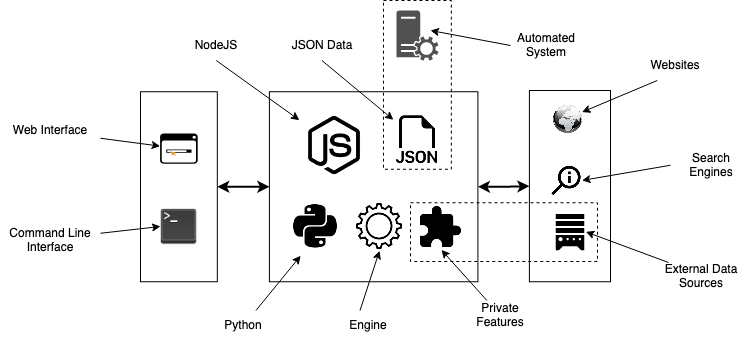
Structure
APP (Preferred!)
Standard localhost WEB APP url: http://0.0.0.0:9005/app.html
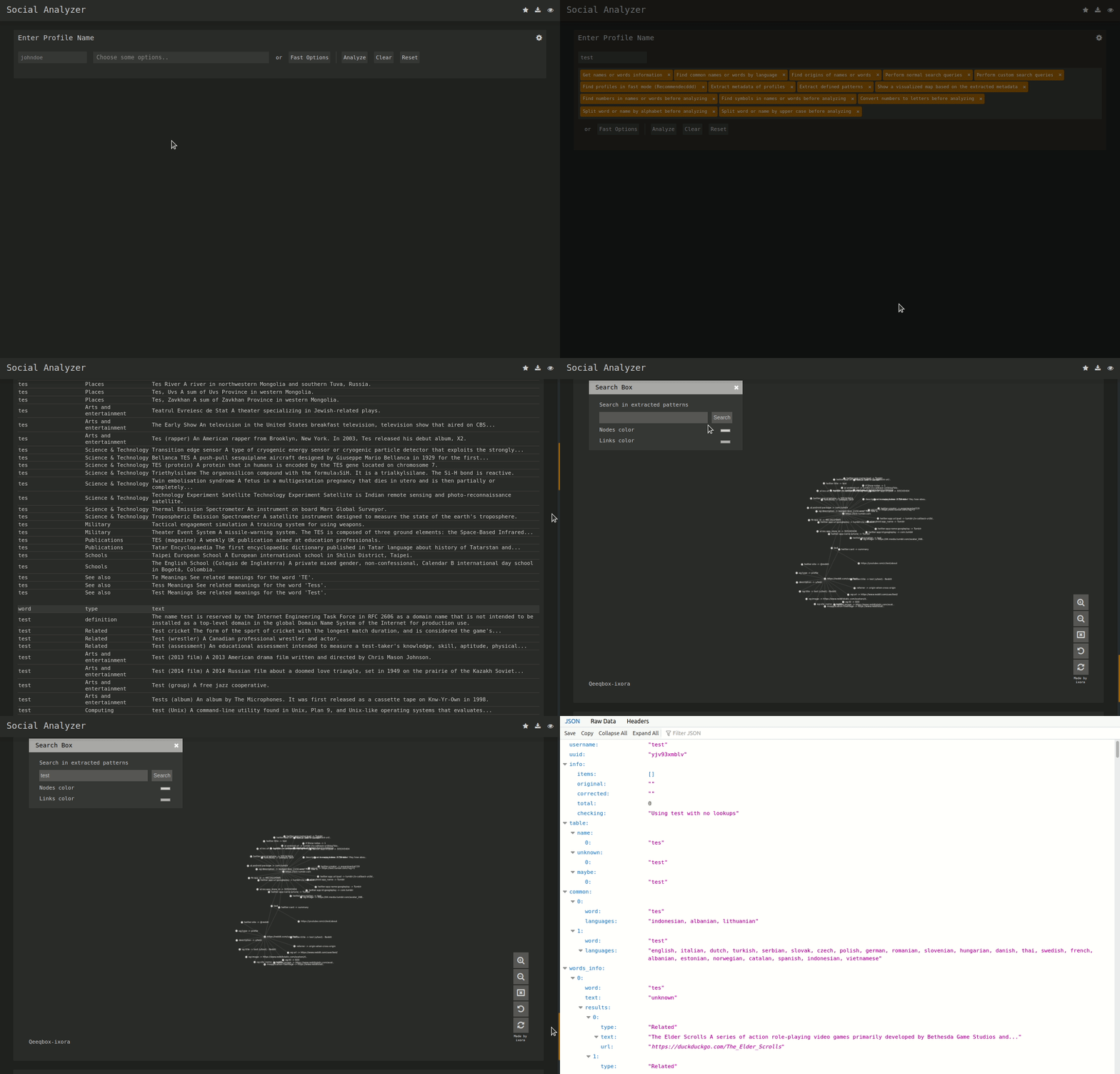
CLI

Features
- String & name analysis (Permutations and Combinations)
- Find a profile using multiple techniques (HTTPS library & Webdriver)
- Multi profile search (Used for correlation - any combination separated with "," )
- Multilayers detections (OCR, normal, advanced & special)
- Visualized profile information using Ixora (Metadata & Patterns)
- Metadata & Patterns extraction (Added from Qeeqbox OSINT project)
- Force-directed Graph for Metadata (Needs ExtractPatterns)
- Search by top ranking or by country (Alexa Ranking)
- Search by type (adult, music, etc.. - automated websites stats)
- Profiles stats and static info (Category country)
- Cross Metadata stats (Added from Qeeqbox OSINT project)
- Auto-flirtation to unnecessary output (Enable javascript etc..)
- Search engine lookup (Google API - optional)
- Custom search queries (Google API & DuckDuckGo API - optional)
- Profile screenshot, title, info, and website description
- Find name origins, name similarity & common words by language
- Find possible profile\person age (Limited analysis)
- Custom user-agent, proxy, timeout & implicit wait
- Python CLI & NodeJS CLI (limited to FindUserProfilesFast option)
- Screenshots of detected profile (The latest version of Chrome must be installed)
- Grid option for faster checking (limited to docker-compose)
- Dump logs to folder or terminal (prettified)
- Adjust finding\getting profile workers (default 15)
- Re-checking option for failed profiles
- Filter profiles by good, maybe, and bad
- Save the analysis as a JSON file
- Simplified web interface and CLI
- And, more!!
Special Detections
- Facebook (Phone number, name, or profile name)
- Gmail ([email protected])
- Google ([email protected])
Install & Run
Linux (As Node WebApp)
sudo apt-get update
#Depedning on your Linux distro, you may or may not need these 2 lines
sudo DEBIAN_FRONTEND=noninteractive apt-get install -y software-properties-common
sudo add-apt-repository ppa:mozillateam/ppa -y
sudo apt-get install -y firefox-esr tesseract-ocr git nodejs npm
git clone https://github.com/qeeqbox/social-analyzer.git
cd social-analyzer
npm update
npm install
npm start
Linux (As Node CLI)
sudo apt-get update
#Depedning on your Linux distro, you may or may not need these 2 lines
sudo DEBIAN_FRONTEND=noninteractive apt-get install -y software-properties-common
sudo add-apt-repository ppa:mozillateam/ppa -y
sudo apt-get install -y firefox-esr tesseract-ocr git nodejs npm
git clone https://github.com/qeeqbox/social-analyzer.git
cd social-analyzer
npm install
nodejs app.js --username "johndoe"
#or
nodejs app.js --username "johndoe,janedoe" --metadata
#or
nodejs app.js --username "johndoe,janedoe" --metadata --top 100
#or
nodejs app.js --username "johndoe" --type "adult"
Linux (As python package)
sudo apt-get update
sudo apt-get install python3 python3-pip
pip3 install social-analyzer
python3 -m social-analyzer --username "johndoe"
#or
python3 -m social-analyzer --username "johndoe" --metadata
#or
python3 -m social-analyzer --username "johndoe" --metadata --top 100
#or
python3 -m social-analyzer --username "johndoe" --type "adult"
#or
python3 -m social-analyzer --username "johndoe" --websites "car" --logs --screenshots
Linux (As python script)
sudo apt-get update
sudo apt-get install git python3 python3-pip
git clone https://github.com/qeeqbox/social-analyzer
cd social-analyzer
pip3 install -r requirements.txt
python3 app.py --username "janedoe"
#or
python3 app.py --username "johndoe" --metadata
#or
python3 app.py --username "johndoe" --metadata --top 100
#or
python3 app.py --username "johndoe" --type "adult"
#or
python3 app.py --username "johndoe" --websites "car" --logs --screenshots
Importing as object (python)
#E.g. #1
from importlib import import_module
SocialAnalyzer = import_module("social-analyzer").SocialAnalyzer()
results = SocialAnalyzer.run_as_object(username="johndoe",silent=True)
print(results)

#E.g. #2
from importlib import import_module
SocialAnalyzer = import_module("social-analyzer").SocialAnalyzer()
results = SocialAnalyzer.run_as_object(username="johndoe,janedoe",silent=True,output="json",filter="good",metadata=False,timeout=10, profiles="detected")
print(results)
Linux, Windows, MacOS, Raspberry pi..
- check this wiki for all possible installation methods
- check this wiki for integrating social-analyzer with your OSINT tools, feeds, etc...
social-analyzer --h
Required Arguments:
  --username   E.g. johndoe, john_doe or johndoe9999

Optional Arguments:
  --websites    A website or websites separated by space E.g. youtube, tiktokor tumblr
  --mode        Analysis mode E.g.fast -> FindUserProfilesFast, slow -> FindUserProfilesSlow or special -> FindUserProfilesSpecial
  --output      Show the output in the following format: json -> json outputfor integration or pretty -> prettify the output
  --options     Show the following when a profile is found: link, rate, titleor text
  --method      find -> show detected profiles, get -> show all profiles regardless detected or not, all -> combine find & get
  --filter      Filter detected profiles by good, maybe or bad, you can do combine them with comma (good,bad) or use all
  --profiles    Filter profiles by detected, unknown or failed, you can do combine them with comma (detected,failed) or use all
  --countries   select websites by country or countries separated by space as: us br ru
  --type        Select websites by type (Adult, Music etc)
  --top         select top websites as 10, 50 etc...[--websites is not needed]
  --extract     Extract profiles, urls & patterns if possible
  --metadata    Extract metadata if possible (pypi QeeqBox OSINT)
  --trim        Trim long strings
  --gui         Reserved for a gui (Not implemented)
  --cli         Reserved for a cli (Not needed)

Listing websites & detections:
  --list        List all available websites

Setting:
  --headers     Headers as dict
  --logs_dir    Change logs directory
  --timeout     Change timeout between each request
  --silent      Disable output to screen
Open Shell


Resources
- DuckDuckGo API, Google API, NodeJS, bootstrap, selectize, jQuery, Wikipedia, font-awesome, selenium-webdriver & tesseract.js
- Let me know if I missed a reference or resource!
Disclaimer\Notes
- Download this project from GitHub and treat it as a security project
- If you want your website to be excluded from this project list, please reach out to me
- This tool is meant to be used locally, not as a service (It does not have any Access Control)
- For issues related to modules that end with -private or under the private group
 , reach out directly to me (do not open an issue on GitHub)
Other Projects


Discover Repositories
Search across tracked repositories by name or description