
jamiepine/voicebox
The open-source AI voice studio. Clone, dictate, create.
Build with Backblaze B2
SDKs, agent skills, IDE extensions, and reference pipelines from Backblaze Labs. All open source.
Loading star history...
Use Cases & Benefits
- Provides a local-first open-source voice synthesis studio for cloning voices, generating speech, applying effects, and composing multi-voice projects.
- Ensures complete privacy by running all models and voice data locally without cloud dependency, supporting multiple TTS engines and languages.
- Use for creating custom voice clones and expressive speech for game dialogue or interactive media.
- Use for producing podcasts or audio narratives with multi-track timeline editing and real-time audio effects.
- Use for integrating voice synthesis into accessibility tools or voice assistants via a comprehensive REST API.
About voicebox

Voicebox
The open-source voice synthesis studio.
Clone voices. Generate speech. Apply effects. Build voice-powered apps.
All running locally on your machine.


voicebox.sh • Docs • Download • Features • API
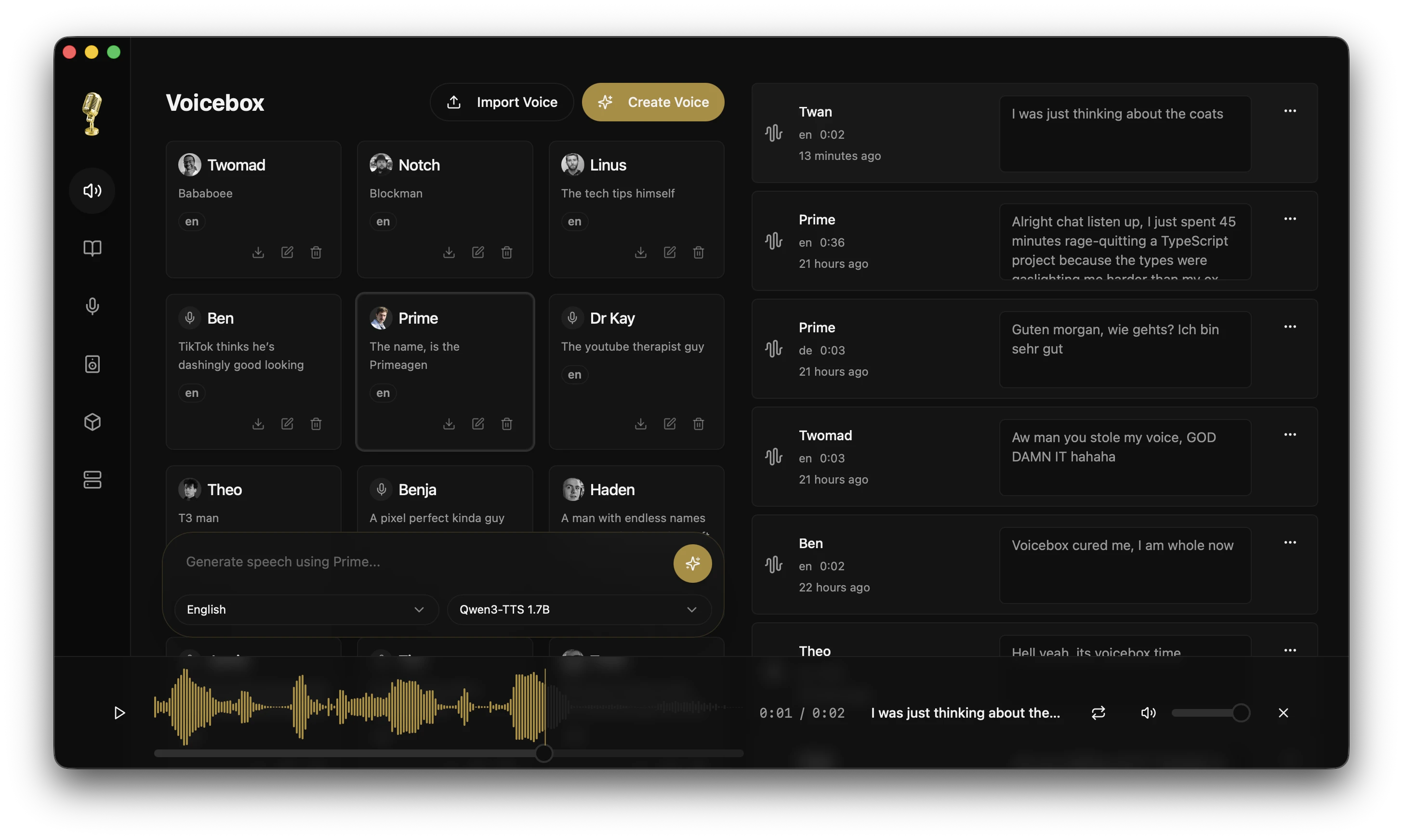
Click the image above to watch the demo video on voicebox.sh
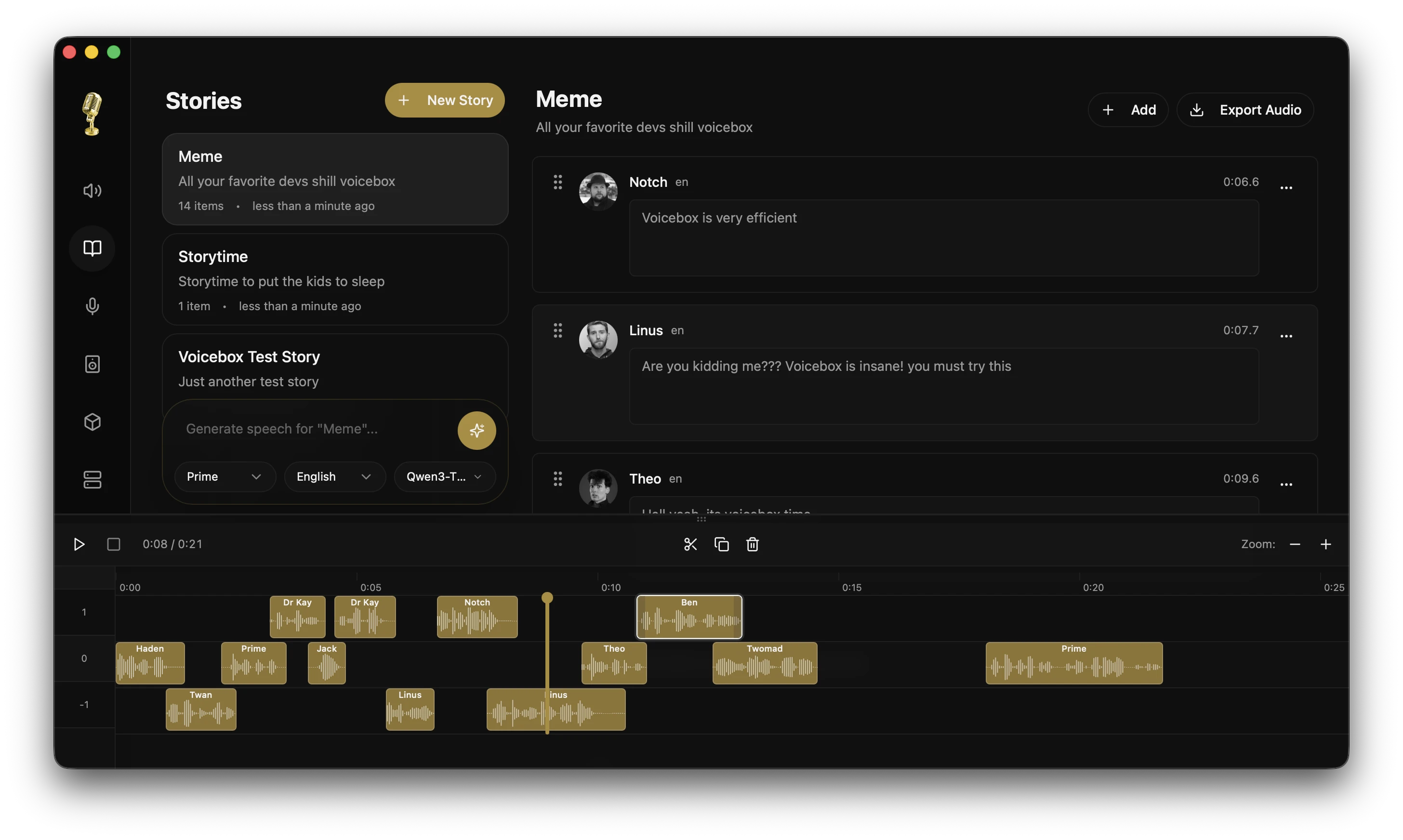
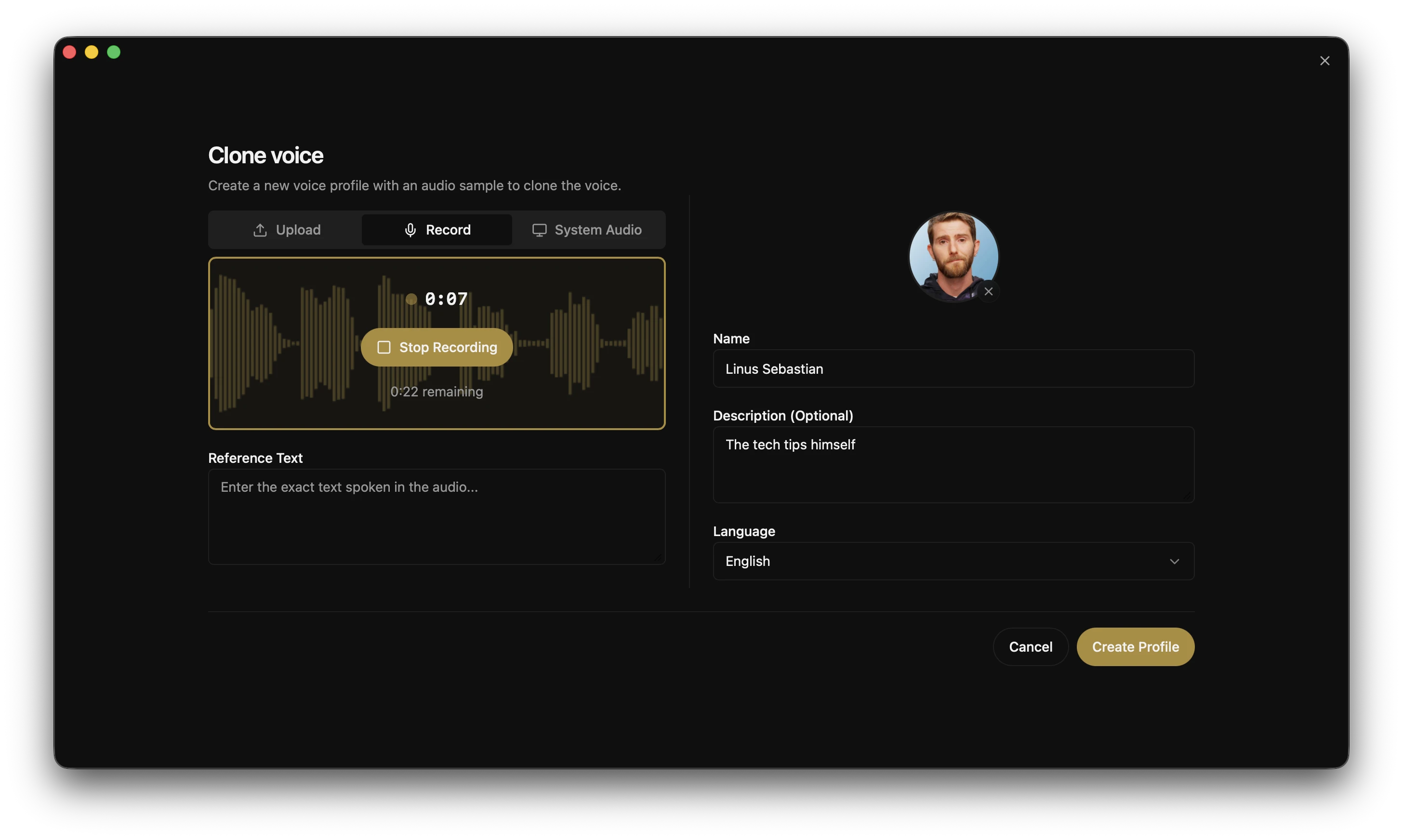
What is Voicebox?
Voicebox is a local-first voice cloning studio — a free and open-source alternative to ElevenLabs. Clone voices from a few seconds of audio, generate speech in 23 languages across 5 TTS engines, apply post-processing effects, and compose multi-voice projects with a timeline editor.
- Complete privacy — models and voice data stay on your machine
- 5 TTS engines — Qwen3-TTS, LuxTTS, Chatterbox Multilingual, Chatterbox Turbo, and HumeAI TADA
- 23 languages — from English to Arabic, Japanese, Hindi, Swahili, and more
- Post-processing effects — pitch shift, reverb, delay, chorus, compression, and filters
- Expressive speech — paralinguistic tags like
[laugh],[sigh],[gasp]via Chatterbox Turbo - Unlimited length — auto-chunking with crossfade for scripts, articles, and chapters
- Stories editor — multi-track timeline for conversations, podcasts, and narratives
- API-first — REST API for integrating voice synthesis into your own projects
- Native performance — built with Tauri (Rust), not Electron
- Runs everywhere — macOS (MLX/Metal), Windows (CUDA), Linux, AMD ROCm, Intel Arc, Docker
Download
| Platform | Download |
|---|---|
| macOS (Apple Silicon) | Download DMG |
| macOS (Intel) | Download DMG |
| Windows | Download MSI |
| Docker | docker compose up |
Linux — Pre-built binaries are not yet available. See voicebox.sh/linux-install for build-from-source instructions.
Features
Multi-Engine Voice Cloning
Five TTS engines with different strengths, switchable per-generation:
| Engine | Languages | Strengths |
|---|---|---|
| Qwen3-TTS (0.6B / 1.7B) | 10 | High-quality multilingual cloning, delivery instructions ("speak slowly", "whisper") |
| LuxTTS | English | Lightweight (~1GB VRAM), 48kHz output, 150x realtime on CPU |
| Chatterbox Multilingual | 23 | Broadest language coverage — Arabic, Danish, Finnish, Greek, Hebrew, Hindi, Malay, Norwegian, Polish, Swahili, Swedish, Turkish and more |
| Chatterbox Turbo | English | Fast 350M model with paralinguistic emotion/sound tags |
| TADA (1B / 3B) | 10 | HumeAI speech-language model — 700s+ coherent audio, text-acoustic dual alignment |
Emotions & Paralinguistic Tags
Type / in the text input to insert expressive tags that the model synthesizes inline with speech (Chatterbox Turbo):
[laugh] [chuckle] [gasp] [cough] [sigh] [groan] [sniff] [shush] [clear throat]
Post-Processing Effects
8 audio effects powered by Spotify's pedalboard library. Apply after generation, preview in real time, build reusable presets.
| Effect | Description |
|---|---|
| Pitch Shift | Up or down by up to 12 semitones |
| Reverb | Configurable room size, damping, wet/dry mix |
| Delay | Echo with adjustable time, feedback, and mix |
| Chorus / Flanger | Modulated delay for metallic or lush textures |
| Compressor | Dynamic range compression |
| Gain | Volume adjustment (-40 to +40 dB) |
| High-Pass Filter | Remove low frequencies |
| Low-Pass Filter | Remove high frequencies |
Ships with 4 built-in presets (Robotic, Radio, Echo Chamber, Deep Voice) and supports custom presets. Effects can be assigned per-profile as defaults.
Unlimited Generation Length
Text is automatically split at sentence boundaries and each chunk is generated independently, then crossfaded together. Works with all engines.
- Configurable auto-chunking limit (100–5,000 chars)
- Crossfade slider (0–200ms) for smooth transitions
- Max text length: 50,000 characters
- Smart splitting respects abbreviations, CJK punctuation, and
[tags]
Generation Versions
Every generation supports multiple versions with provenance tracking:
- Original — clean TTS output, always preserved
- Effects versions — apply different effects chains from any source version
- Takes — regenerate with a new seed for variation
- Source tracking — each version records its lineage
- Favorites — star generations for quick access
Async Generation Queue
Generation is non-blocking. Submit and immediately start typing the next one.
- Serial execution queue prevents GPU contention
- Real-time SSE status streaming
- Failed generations can be retried
- Stale generations from crashes auto-recover on startup
Voice Profile Management
- Create profiles from audio files or record directly in-app
- Import/export profiles to share or back up
- Multi-sample support for higher quality cloning
- Per-profile default effects chains
- Organize with descriptions and language tags
Stories Editor
Multi-voice timeline editor for conversations, podcasts, and narratives.
- Multi-track composition with drag-and-drop
- Inline audio trimming and splitting
- Auto-playback with synchronized playhead
- Version pinning per track clip
Recording & Transcription
- In-app recording with waveform visualization
- System audio capture (macOS and Windows)
- Automatic transcription powered by Whisper (including Whisper Turbo)
- Export recordings in multiple formats
Model Management
- Per-model unload to free GPU memory without deleting downloads
- Custom models directory via
VOICEBOX_MODELS_DIR - Model folder migration with progress tracking
- Download cancel/clear UI
GPU Support
| Platform | Backend | Notes |
|---|---|---|
| macOS (Apple Silicon) | MLX (Metal) | 4-5x faster via Neural Engine |
| Windows / Linux (NVIDIA) | PyTorch (CUDA) | Auto-downloads CUDA binary from within the app |
| Linux (AMD) | PyTorch (ROCm) | Auto-configures HSA_OVERRIDE_GFX_VERSION |
| Windows (any GPU) | DirectML | Universal Windows GPU support |
| Intel Arc | IPEX/XPU | Intel discrete GPU acceleration |
| Any | CPU | Works everywhere, just slower |
API
Voicebox exposes a full REST API for integrating voice synthesis into your own apps.
# Generate speech
curl -X POST http://localhost:17493/generate \
  -H "Content-Type: application/json" \
  -d '{"text": "Hello world", "profile_id": "abc123", "language": "en"}'

# List voice profiles
curl http://localhost:17493/profiles

# Create a profile
curl -X POST http://localhost:17493/profiles \
  -H "Content-Type: application/json" \
  -d '{"name": "My Voice", "language": "en"}'
Use cases: game dialogue, podcast production, accessibility tools, voice assistants, content automation.
Full API documentation available at http://localhost:17493/docs.
Tech Stack
| Layer | Technology |
|---|---|
| Desktop App | Tauri (Rust) |
| Frontend | React, TypeScript, Tailwind CSS |
| State | Zustand, React Query |
| Backend | FastAPI (Python) |
| TTS Engines | Qwen3-TTS, LuxTTS, Chatterbox, Chatterbox Turbo, TADA |
| Effects | Pedalboard (Spotify) |
| Transcription | Whisper / Whisper Turbo (PyTorch or MLX) |
| Inference | MLX (Apple Silicon) / PyTorch (CUDA/ROCm/XPU/CPU) |
| Database | SQLite |
| Audio | WaveSurfer.js, librosa |
Roadmap
| Feature | Description |
|---|---|
| Real-time Streaming | Stream audio as it generates, word by word |
| Voice Design | Create new voices from text descriptions |
| More Models | XTTS, Bark, and other open-source voice models |
| Plugin Architecture | Extend with custom models and effects |
| Mobile Companion | Control Voicebox from your phone |
Development
See CONTRIBUTING.md for detailed setup and contribution guidelines.
Quick Start
git clone https://github.com/jamiepine/voicebox.git
cd voicebox

just setup   # creates Python venv, installs all deps
just dev     # starts backend + desktop app
Install just: brew install just or cargo install just. Run just --list to see all commands.
Prerequisites: Bun, Rust, Python 3.11+, Tauri Prerequisites, and Xcode on macOS.
Building Locally
just build          # Build CPU server binary + Tauri app
just build-local    # (Windows) Build CPU + CUDA server binaries + Tauri app
Adding New Voice Models
The multi-engine architecture makes adding new TTS engines straightforward. A step-by-step guide covers the full process: dependency research, backend protocol implementation, frontend wiring, and PyInstaller bundling.
The guide is optimized for AI coding agents. An agent skill can pick up a model name and handle the entire integration autonomously — you just test the build locally.
Project Structure
voicebox/
├── app/              # Shared React frontend
├── tauri/            # Desktop app (Tauri + Rust)
├── web/              # Web deployment
├── backend/          # Python FastAPI server
├── landing/          # Marketing website
└── scripts/          # Build & release scripts
Contributing
Contributions welcome! See CONTRIBUTING.md for guidelines.
- Fork the repo
- Create a feature branch
- Make your changes
- Submit a PR
Security
Found a security vulnerability? Please report it responsibly. See SECURITY.md for details.
License
MIT License — see LICENSE for details.
Discover Repositories
Search across tracked repositories by name or description