
headroomlabs-ai/headroom
Compress tool outputs, logs, files, and RAG chunks before they reach the LLM. 20% fewer tokens for coding agents, 60-95% fewer tokens for JSON, same answers. Library, proxy, MCP server.
Build with Backblaze B2
SDKs, agent skills, IDE extensions, and reference pipelines from Backblaze Labs. All open source.
Loading star history...
Use Cases & Benefits
- Compresses AI agent inputs like tool outputs, logs, files, and RAG chunks to reduce token usage before sending to large language models.
- Provides lossless, multi-algorithm compression locally with reversible context retrieval, preserving accuracy while significantly reducing token costs.
- Use for optimizing token consumption in coding agents such as Claude Code, Codex, and Cursor to lower API usage and latency.
- Use for compressing JSON, code, and logs in multi-agent workflows with SharedContext to efficiently share compressed context across agents.
- Use for integrating transparent proxy compression in existing Python or TypeScript LLM applications without code changes via a proxy or SDK.
About headroom
Headroom
Compress everything your AI agent reads. Same answers, fraction of the tokens.
Every tool call, DB query, file read, and RAG retrieval your agent makes is 70-95% boilerplate.
Headroom compresses it away before it hits the model.
Works with any agent — coding agents (Claude Code, Codex, Cursor, Aider), custom agents
(LangChain, LangGraph, Agno, Strands, OpenClaw), or your own Python and TypeScript code.








Where Headroom Fits
Your Agent / App
  (coding agents, customer support bots, RAG pipelines,
   data analysis agents, research agents, any LLM app)
      │
      │  tool calls, logs, DB reads, RAG results, file reads, API responses
      ▼
   Headroom  ← proxy, Python/TypeScript SDK, or framework integration
      │
      ▼
 LLM Provider  (OpenAI, Anthropic, Google, Bedrock, 100+ via LiteLLM)
Headroom sits between your application and the LLM provider. It intercepts requests, compresses the context, and forwards an optimized prompt. Use it as a transparent proxy (zero code changes), a Python function (compress()), or a framework integration (LangChain, LiteLLM, Agno).
What gets compressed
Headroom optimizes any data your agent injects into a prompt:
- Tool outputs — shell commands, API calls, search results
- Database queries — SQL results, key-value lookups
- RAG retrievals — document chunks, embeddings results
- File reads — code, logs, configs, CSVs
- API responses — JSON, XML, HTML
- Conversation history — long agent sessions with repetitive context
Quick Start
Python:
pip install "headroom-ai[all]"
TypeScript / Node.js:
npm install headroom-ai
Any agent — one function
Python:
from headroom import compress

result = compress(messages, model="claude-sonnet-4-5-20250929")
response = client.messages.create(model="claude-sonnet-4-5-20250929", messages=result.messages)
print(f"Saved {result.tokens_saved} tokens ({result.compression_ratio:.0%})")
TypeScript:
import { compress } from 'headroom-ai';

const result = await compress(messages, { model: 'gpt-4o' });
const response = await openai.chat.completions.create({ model: 'gpt-4o', messages: result.messages });
console.log(`Saved ${result.tokensSaved} tokens`);
Works with any LLM client — Anthropic, OpenAI, LiteLLM, Bedrock, Vercel AI SDK, or your own code.
Any agent — proxy (zero code changes)
headroom proxy --port 8787
# Point any LLM client at the proxy
ANTHROPIC_BASE_URL=http://localhost:8787 your-app
OPENAI_BASE_URL=http://localhost:8787/v1 your-app
Works with any language, any tool, any framework. Proxy docs
Coding agents — one command
headroom wrap claude       # Starts proxy + launches Claude Code
headroom wrap codex        # Starts proxy + launches OpenAI Codex CLI
headroom wrap aider        # Starts proxy + launches Aider
headroom wrap cursor       # Starts proxy + prints Cursor config
headroom wrap openclaw     # Installs + configures OpenClaw plugin
Headroom starts a proxy, points your tool at it, and compresses everything automatically.
Multi-agent — SharedContext
from headroom import SharedContext

ctx = SharedContext()
ctx.put("research", big_agent_output)      # Agent A stores (compressed)
summary = ctx.get("research")               # Agent B reads (~80% smaller)
full = ctx.get("research", full=True)       # Agent B gets original if needed
Compress what moves between agents — any framework. SharedContext Guide
MCP Tools (Claude Code, Cursor)
headroom mcp install && claude
Gives your AI tool three MCP tools: headroom_compress, headroom_retrieve, headroom_stats. MCP Guide
Drop into your existing stack
| Your setup | Add Headroom | One-liner |
|---|---|---|
| Any Python app | compress() | result = compress(messages, model="gpt-4o") |
| Any TypeScript app | compress() | const result = await compress(messages, { model: 'gpt-4o' }) |
| Vercel AI SDK | Middleware | wrapLanguageModel({ model, middleware: headroomMiddleware() }) |
| OpenAI Node SDK | Wrap client | const client = withHeadroom(new OpenAI()) |
| Anthropic TS SDK | Wrap client | const client = withHeadroom(new Anthropic()) |
| Multi-agent | SharedContext | ctx = SharedContext(); ctx.put("key", data) |
| LiteLLM | Callback | litellm.callbacks = [HeadroomCallback()] |
| Any Python proxy | ASGI Middleware | app.add_middleware(CompressionMiddleware) |
| Agno agents | Wrap model | HeadroomAgnoModel(your_model) |
| LangChain | Wrap model | HeadroomChatModel(your_llm) |
| OpenClaw | One-command wrap | headroom wrap openclaw |
| Claude Code | Wrap | headroom wrap claude |
| Codex / Aider | Wrap | headroom wrap codex or headroom wrap aider |
Full Integration Guide | TypeScript SDK
Demo
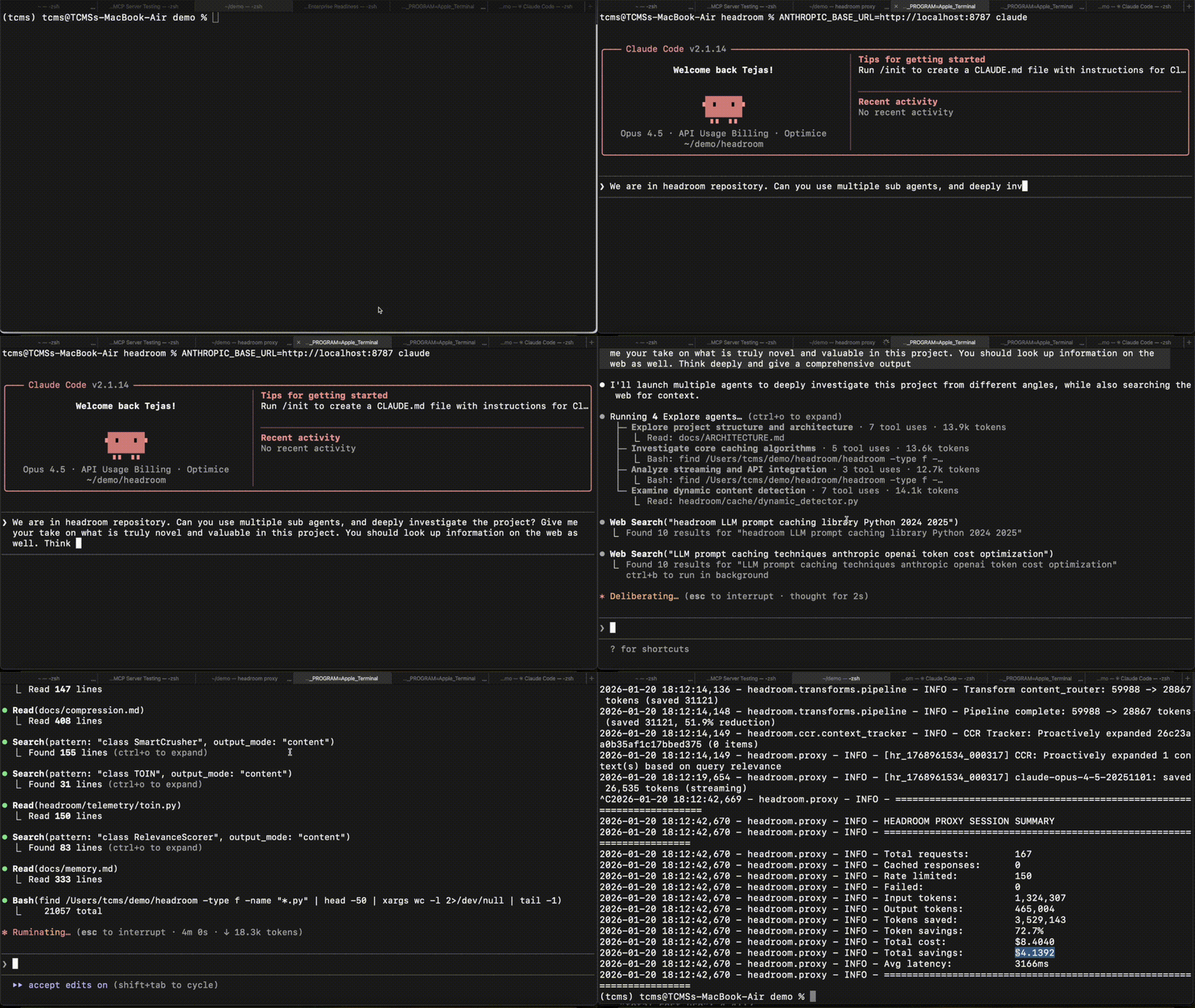
Does It Actually Work?
100 production log entries. One critical error buried at position 67.
| Baseline | Headroom | |
|---|---|---|
| Input tokens | 10,144 | 1,260 |
| Correct answers | 4/4 | 4/4 |
Both responses: "payment-gateway, error PG-5523, fix: Increase max_connections to 500, 1,847 transactions affected."
87.6% fewer tokens. Same answer. Run it: python examples/needle_in_haystack_test.py
What Headroom kept
From 100 log entries, SmartCrusher kept 6: first 3 (boundary), the FATAL error at position 67 (anomaly detection), and last 2 (recency). The error was automatically preserved — not by keyword matching, but by statistical analysis of field variance.
Real Workloads
| Scenario | Before | After | Savings |
|---|---|---|---|
| Code search (100 results) | 17,765 | 1,408 | 92% |
| SRE incident debugging | 65,694 | 5,118 | 92% |
| Codebase exploration | 78,502 | 41,254 | 47% |
| GitHub issue triage | 54,174 | 14,761 | 73% |
Accuracy Benchmarks
Compression preserves accuracy — tested on real OSS benchmarks.
Standard Benchmarks — Baseline (direct to API) vs Headroom (through proxy):
| Benchmark | Category | N | Baseline | Headroom | Delta |
|---|---|---|---|---|---|
| GSM8K | Math | 100 | 0.870 | 0.870 | 0.000 |
| TruthfulQA | Factual | 100 | 0.530 | 0.560 | +0.030 |
Compression Benchmarks — Accuracy after full compression stack:
| Benchmark | Category | N | Accuracy | Compression | Method |
|---|---|---|---|---|---|
| SQuAD v2 | QA | 100 | 97% | 19% | Before/After |
| BFCL | Tool/Function | 100 | 97% | 32% | LLM-as-Judge |
| Tool Outputs (built-in) | Agent | 8 | 100% | 20% | Before/After |
| CCR Needle Retention | Lossless | 50 | 100% | 77% | Exact Match |
Run it yourself:
# Quick smoke test (8 cases, ~10s)
python -m headroom.evals quick -n 8 --provider openai --model gpt-4o-mini

# Full Tier 1 suite (~$3, ~15 min)
python -m headroom.evals suite --tier 1 -o eval_results/

# CI mode (exit 1 on regression)
python -m headroom.evals suite --tier 1 --ci
Full methodology: Benchmarks | Evals Framework
Key Capabilities
Lossless Compression
Headroom never throws data away. It compresses aggressively, stores the originals, and gives the LLM a tool to retrieve full details when needed. When it compresses 500 items to 20, it tells the model what was omitted ("87 passed, 2 failed, 1 error") so the model knows when to ask for more.
Smart Content Detection
Auto-detects what's in your context — JSON arrays, code, logs, plain text — and routes each to the best compressor. JSON goes to SmartCrusher, code goes through AST-aware compression (Python, JS, Go, Rust, Java, C++), text goes to Kompress (ModernBERT-based, with [ml] extra).
Cache Optimization
Stabilizes message prefixes so your provider's KV cache actually works. Claude offers a 90% read discount on cached prefixes — but almost no framework takes advantage of it. Headroom does.
Failure Learning
headroom learn                   # Analyze past Claude Code sessions, show recommendations
headroom learn --apply           # Write learnings to CLAUDE.md and MEMORY.md
headroom learn --all --apply     # Learn across all your projects
Reads your conversation history, finds every failed tool call, correlates it with what eventually succeeded, and writes specific corrections into your project files. Next session starts smarter. Learn docs

Image Compression
40-90% token reduction via trained ML router. Automatically selects the right resize/quality tradeoff per image.
All features
| Feature | What it does |
|---|---|
| Content Router | Auto-detects content type, routes to optimal compressor |
| SmartCrusher | Universal JSON compression — arrays of dicts, strings, numbers, mixed types, nested objects |
| CodeCompressor | AST-aware compression for Python, JS, Go, Rust, Java, C++ |
| Kompress | ModernBERT token compression (replaces LLMLingua-2) |
| CCR | Reversible compression — LLM retrieves originals when needed |
| Compression Summaries | Tells the LLM what was omitted ("3 errors, 12 failures") |
| CacheAligner | Stabilizes prefixes for provider KV cache hits |
| IntelligentContext | Score-based context management with learned importance |
| Image Compression | 40-90% token reduction via trained ML router |
| Memory | Persistent memory across conversations |
| Compression Hooks | Customize compression with pre/post hooks |
| Read Lifecycle | Detects stale/superseded Read outputs, replaces with CCR markers |
headroom learn | Analyzes past failures, writes project-specific learnings to CLAUDE.md/MEMORY.md |
headroom wrap | One-command setup for Claude Code, Codex, Aider, Cursor |
| SharedContext | Compressed inter-agent context sharing for multi-agent workflows |
| MCP Tools | headroom_compress, headroom_retrieve, headroom_stats for Claude Code/Cursor |
Headroom vs Alternatives
Context compression is a new space. Here's how the approaches differ:
| Approach | Scope | Deploy as | Framework integrations | Data stays local? | Reversible | |
|---|---|---|---|---|---|---|
| Headroom | Multi-algorithm compression | All context (tool outputs, DB reads, RAG, files, logs, history) | Proxy, Python library, ASGI middleware, or callback | LangChain, LangGraph, Agno, Strands, LiteLLM, MCP | Yes (OSS) | Yes (CCR) |
| RTK | CLI command rewriter | Shell command outputs | CLI wrapper | None | Yes (OSS) | No |
| Compresr | Cloud compression API | Text sent to their API | API call | None | No | No |
| Token Company | Cloud compression API | Text sent to their API | API call | None | No | No |
Use it however you want. Headroom works as a standalone proxy (headroom proxy), a one-function Python library (compress()), ASGI middleware, or a LiteLLM callback. Already using LiteLLM, LangChain, or Agno? Drop Headroom in without replacing anything.
Headroom + RTK work well together. RTK rewrites CLI commands (git show → git show --short), Headroom compresses everything else (JSON arrays, code, logs, RAG results, conversation history). Use both.
Headroom vs cloud APIs. Compresr and Token Company are hosted services — you send your context to their servers, they compress and return it. Headroom runs locally. Your data never leaves your machine. You also get lossless compression (CCR): the LLM can retrieve the full original when it needs more detail.
How It Works Inside
  Your prompt
      │
      ▼
  1. CacheAligner            Stabilize prefix for KV cache
      │
      ▼
  2. ContentRouter           Route each content type:
      │                         → SmartCrusher    (JSON)
      │                         → CodeCompressor  (code)
      │                         → Kompress        (text, with [ml])
      ▼
  3. IntelligentContext      Score-based token fitting
      │
      ▼
  LLM Provider

  Needs full details? LLM calls headroom_retrieve.
  Originals are in the Compressed Store — nothing is thrown away.
Overhead: 15-200ms compression latency (net positive for Sonnet/Opus). Full data: Latency Benchmarks
Integrations
| Integration | Status | Docs |
|---|---|---|
headroom wrap claude/codex/aider/cursor | Stable | Proxy Docs |
compress() — one function | Stable | Integration Guide |
SharedContext — multi-agent | Stable | SharedContext Guide |
| LiteLLM callback | Stable | Integration Guide |
| ASGI middleware | Stable | Integration Guide |
| Proxy server | Stable | Proxy Docs |
| Agno | Stable | Agno Guide |
| MCP (Claude Code, Cursor, etc.) | Stable | MCP Guide |
| Strands | Stable | Strands Guide |
| LangChain | Stable | LangChain Guide |
| OpenClaw | Stable | OpenClaw plugin |
OpenClaw Plugin
The @headroom-ai/openclaw plugin integrates Headroom as a ContextEngine for OpenClaw. It compresses tool outputs, code, logs, and structured data inline — 70-90% token savings with zero LLM calls. The plugin can connect to a local or remote Headroom proxy and will auto-start one locally if needed.
Install
pip install "headroom-ai[proxy]"
openclaw plugins install --dangerously-force-unsafe-install headroom-ai/openclaw
Why
--dangerously-force-unsafe-install? The plugin auto-startsheadroom proxyas a subprocess when no running proxy is detected. OpenClaw blocks process-launching plugins by default, so this flag is required to permit that behavior.
Once installed, assign Headroom as the context engine in your OpenClaw config:
{
  "plugins": {
    "entries": { "headroom": { "enabled": true } },
    "slots": { "contextEngine": "headroom" }
  }
}
The plugin auto-detects and auto-starts the proxy — no manual proxy management needed. See the plugin README for full configuration options, local development setup, and launcher details.
Cloud Providers
headroom proxy --backend bedrock --region us-east-1     # AWS Bedrock
headroom proxy --backend vertex_ai --region us-central1 # Google Vertex
headroom proxy --backend azure                          # Azure OpenAI
headroom proxy --backend openrouter                     # OpenRouter (400+ models)
Installation
pip install headroom-ai                # Core library
pip install "headroom-ai[all]"         # Everything including evals (recommended)
pip install "headroom-ai[proxy]"       # Proxy server + MCP tools
pip install "headroom-ai[mcp]"         # MCP tools only (no proxy)
pip install "headroom-ai[ml]"          # ML compression (Kompress, requires torch)
pip install "headroom-ai[agno]"        # Agno integration
pip install "headroom-ai[langchain]"   # LangChain (experimental)
pip install "headroom-ai[evals]"       # Evaluation framework only
Python 3.10+
Documentation
| Integration Guide | LiteLLM, ASGI, compress(), proxy |
| Proxy Docs | Proxy server configuration |
| Architecture | How the pipeline works |
| CCR Guide | Reversible compression |
| Benchmarks | Accuracy validation |
| Latency Benchmarks | Compression overhead & cost-benefit analysis |
| Limitations | When compression helps, when it doesn't |
| Evals Framework | Prove compression preserves accuracy |
| Memory | Persistent memory |
| Agno | Agno agent framework |
| MCP | Context engineering toolkit (compress, retrieve, stats) |
| SharedContext | Compressed inter-agent context sharing |
| Learn | Offline failure learning for coding agents |
| Configuration | All options |
Community
Questions, feedback, or just want to follow along? Join us on Discord
Contributing
git clone https://github.com/chopratejas/headroom.git && cd headroom
pip install -e ".[dev]" && pytest
License
Apache License 2.0 — see LICENSE.
Discover Repositories
Search across tracked repositories by name or description