
datalab-to/surya
OCR, layout analysis, reading order, table recognition in 90+ languages

Loading star history...
Health Score
25.44
Weekly Growth
+0
+0.0% this week
Contributors
1
Total contributors
Open Issues
132
Generated Insights
About surya
Surya
Surya is a document OCR toolkit that does:
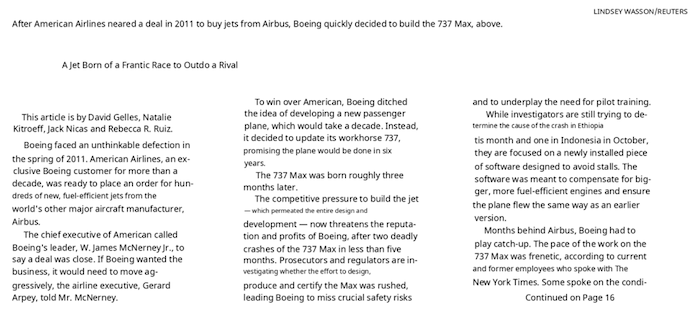
- OCR in 90+ languages that benchmarks favorably vs cloud services
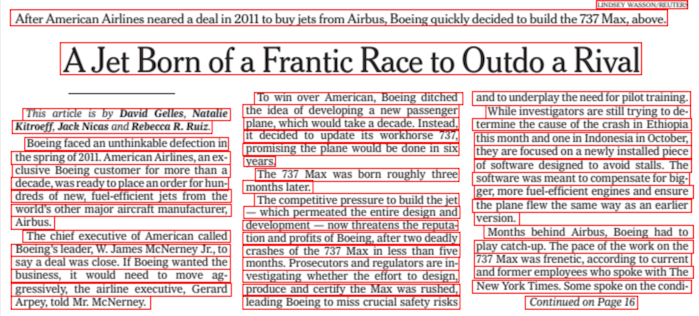
- Line-level text detection in any language
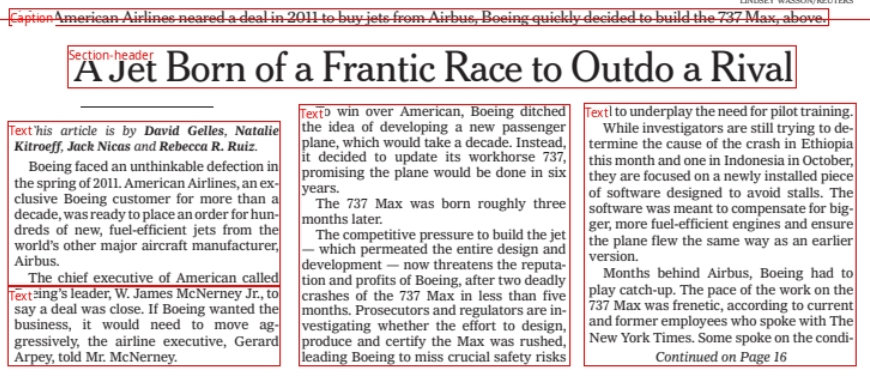
- Layout analysis (table, image, header, etc detection)
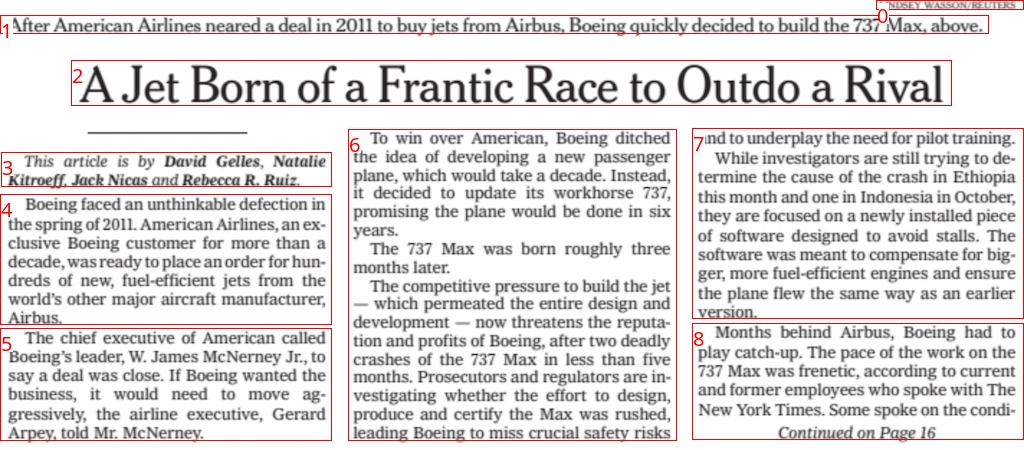
- Reading order detection
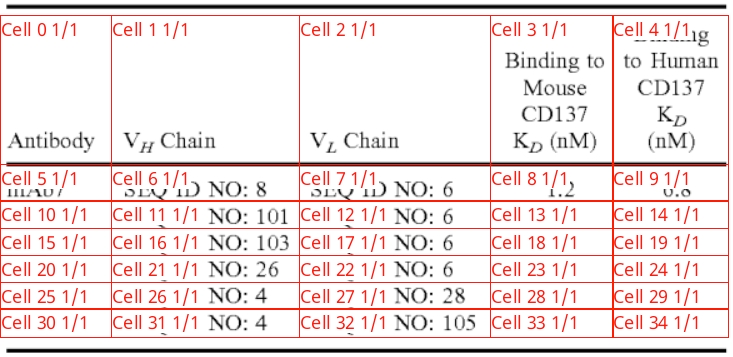
- Table recognition (detecting rows/columns)
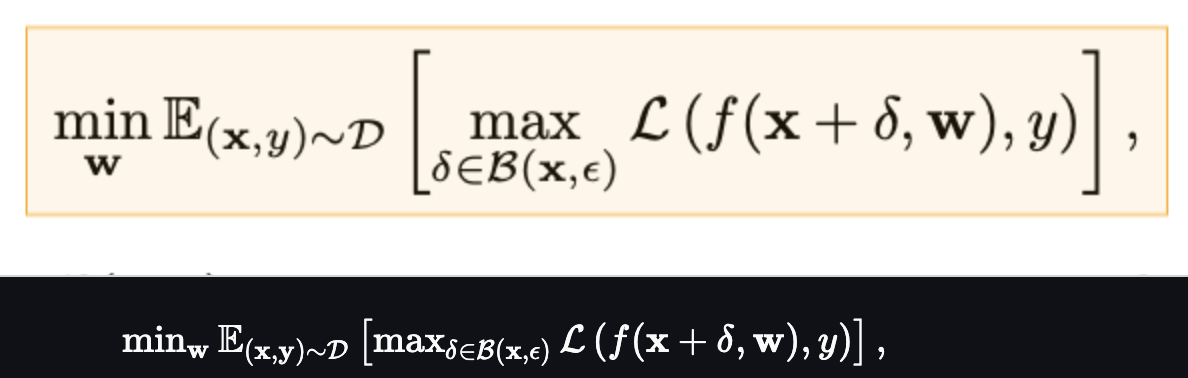
- LaTeX OCR
It works on a range of documents (see usage and benchmarks for more details).
| Detection | OCR |
|---|---|
 |  |
| Layout | Reading Order |
|---|---|
 |  |
| Table Recognition | LaTeX OCR |
|---|---|
 |  |
Surya is named for the Hindu sun god, who has universal vision.
Community
Discord is where we discuss future development.
Examples
| Name | Detection | OCR | Layout | Order | Table Rec |
|---|---|---|---|---|---|
| Japanese | Image | Image | Image | Image | Image |
| Chinese | Image | Image | Image | Image | |
| Hindi | Image | Image | Image | Image | |
| Arabic | Image | Image | Image | Image | |
| Chinese + Hindi | Image | Image | Image | Image | |
| Presentation | Image | Image | Image | Image | Image |
| Scientific Paper | Image | Image | Image | Image | Image |
| Scanned Document | Image | Image | Image | Image | Image |
| New York Times | Image | Image | Image | Image | |
| Scanned Form | Image | Image | Image | Image | Image |
| Textbook | Image | Image | Image | Image |
Hosted API
There is a hosted API for all surya models available here:
- Works with PDF, images, word docs, and powerpoints
- Consistent speed, with no latency spikes
- High reliability and uptime
Commercial usage
Our model weights use a modified AI Pubs Open Rail-M license (free for research, personal use, and startups under $2M funding/revenue) and our code is GPL. For broader commercial licensing or to remove GPL requirements, visit our pricing page here.
Installation
You'll need python 3.10+ and PyTorch. You may need to install the CPU version of torch first if you're not using a Mac or a GPU machine. See here for more details.
Install with:
pip install surya-ocr
Model weights will automatically download the first time you run surya.
Usage
- Inspect the settings in
surya/settings.py. You can override any settings with environment variables. - Your torch device will be automatically detected, but you can override this. For example,
TORCH_DEVICE=cuda.
Interactive App
I've included a streamlit app that lets you interactively try Surya on images or PDF files. Run it with:
pip install streamlit pdftext
surya_gui
OCR (text recognition)
This command will write out a json file with the detected text and bboxes:
surya_ocr DATA_PATH
DATA_PATHcan be an image, pdf, or folder of images/pdfs--task_namewill specify which task to use for predicting the lines.ocr_with_boxesis the default, which will format text and give you bboxes. If you get bad performance, tryocr_without_boxes, which will give you potentially better performance but no bboxes. For blocks like equations and paragraphs, tryblock_without_boxes.--imageswill save images of the pages and detected text lines (optional)--output_dirspecifies the directory to save results to instead of the default--page_rangespecifies the page range to process in the PDF, specified as a single number, a comma separated list, a range, or comma separated ranges - example:0,5-10,20.--disable_math- by default, surya will recognize math in text. This can lead to false positives - you can disable this with this flag.
The results.json file will contain a json dictionary where the keys are the input filenames without extensions. Each value will be a list of dictionaries, one per page of the input document. Each page dictionary contains:
text_lines- the detected text and bounding boxes for each linetext- the text in the lineconfidence- the confidence of the model in the detected text (0-1)polygon- the polygon for the text line in (x1, y1), (x2, y2), (x3, y3), (x4, y4) format. The points are in clockwise order from the top left.bbox- the axis-aligned rectangle for the text line in (x1, y1, x2, y2) format. (x1, y1) is the top left corner, and (x2, y2) is the bottom right corner.chars- the individual characters in the linetext- the text of the characterbbox- the character bbox (same format as line bbox)polygon- the character polygon (same format as line polygon)confidence- the confidence of the model in the detected character (0-1)bbox_valid- if the character is a special token or math, the bbox may not be valid
words- the individual words in the line (computed from the characters)text- the text of the wordbbox- the word bbox (same format as line bbox)polygon- the word polygon (same format as line polygon)confidence- mean character confidencebbox_valid- if the word is a special token or math, the bbox may not be valid
page- the page number in the fileimage_bbox- the bbox for the image in (x1, y1, x2, y2) format. (x1, y1) is the top left corner, and (x2, y2) is the bottom right corner. All line bboxes will be contained within this bbox.
Performance tips
Setting the RECOGNITION_BATCH_SIZE env var properly will make a big difference when using a GPU. Each batch item will use 40MB of VRAM, so very high batch sizes are possible. The default is a batch size 512, which will use about 20GB of VRAM. Depending on your CPU core count, it may help, too - the default CPU batch size is 32.
From python
from PIL import Image
from surya.foundation import FoundationPredictor
from surya.recognition import RecognitionPredictor
from surya.detection import DetectionPredictor

image = Image.open(IMAGE_PATH)
foundation_predictor = FoundationPredictor()
recognition_predictor = RecognitionPredictor(foundation_predictor)
detection_predictor = DetectionPredictor()

predictions = recognition_predictor([image], det_predictor=detection_predictor)
Text line detection
This command will write out a json file with the detected bboxes.
surya_detect DATA_PATH
DATA_PATHcan be an image, pdf, or folder of images/pdfs--imageswill save images of the pages and detected text lines (optional)--output_dirspecifies the directory to save results to instead of the default--page_rangespecifies the page range to process in the PDF, specified as a single number, a comma separated list, a range, or comma separated ranges - example:0,5-10,20.
The results.json file will contain a json dictionary where the keys are the input filenames without extensions. Each value will be a list of dictionaries, one per page of the input document. Each page dictionary contains:
bboxes- detected bounding boxes for textbbox- the axis-aligned rectangle for the text line in (x1, y1, x2, y2) format. (x1, y1) is the top left corner, and (x2, y2) is the bottom right corner.polygon- the polygon for the text line in (x1, y1), (x2, y2), (x3, y3), (x4, y4) format. The points are in clockwise order from the top left.confidence- the confidence of the model in the detected text (0-1)
vertical_lines- vertical lines detected in the documentbbox- the axis-aligned line coordinates.
page- the page number in the fileimage_bbox- the bbox for the image in (x1, y1, x2, y2) format. (x1, y1) is the top left corner, and (x2, y2) is the bottom right corner. All line bboxes will be contained within this bbox.
Performance tips
Setting the DETECTOR_BATCH_SIZE env var properly will make a big difference when using a GPU. Each batch item will use 440MB of VRAM, so very high batch sizes are possible. The default is a batch size 36, which will use about 16GB of VRAM. Depending on your CPU core count, it might help, too - the default CPU batch size is 6.
From python
from PIL import Image
from surya.detection import DetectionPredictor

image = Image.open(IMAGE_PATH)
det_predictor = DetectionPredictor()

# predictions is a list of dicts, one per image
predictions = det_predictor([image])
Layout and reading order
This command will write out a json file with the detected layout and reading order.
surya_layout DATA_PATH
DATA_PATHcan be an image, pdf, or folder of images/pdfs--imageswill save images of the pages and detected text lines (optional)--output_dirspecifies the directory to save results to instead of the default--page_rangespecifies the page range to process in the PDF, specified as a single number, a comma separated list, a range, or comma separated ranges - example:0,5-10,20.
The results.json file will contain a json dictionary where the keys are the input filenames without extensions. Each value will be a list of dictionaries, one per page of the input document. Each page dictionary contains:
bboxes- detected bounding boxes for textbbox- the axis-aligned rectangle for the text line in (x1, y1, x2, y2) format. (x1, y1) is the top left corner, and (x2, y2) is the bottom right corner.polygon- the polygon for the text line in (x1, y1), (x2, y2), (x3, y3), (x4, y4) format. The points are in clockwise order from the top left.position- the reading order of the box.label- the label for the bbox. One ofCaption,Footnote,Formula,List-item,Page-footer,Page-header,Picture,Figure,Section-header,Table,Form,Table-of-contents,Handwriting,Text,Text-inline-math.top_k- the top-k other potential labels for the box. A dictionary with labels as keys and confidences as values.
page- the page number in the fileimage_bbox- the bbox for the image in (x1, y1, x2, y2) format. (x1, y1) is the top left corner, and (x2, y2) is the bottom right corner. All line bboxes will be contained within this bbox.
Performance tips
Setting the LAYOUT_BATCH_SIZE env var properly will make a big difference when using a GPU. Each batch item will use 220MB of VRAM, so very high batch sizes are possible. The default is a batch size 32, which will use about 7GB of VRAM. Depending on your CPU core count, it might help, too - the default CPU batch size is 4.
From python
from PIL import Image
from surya.layout import LayoutPredictor

image = Image.open(IMAGE_PATH)
layout_predictor = LayoutPredictor()

# layout_predictions is a list of dicts, one per image
layout_predictions = layout_predictor([image])
Table Recognition
This command will write out a json file with the detected table cells and row/column ids, along with row/column bounding boxes. If you want to get cell positions and text, along with nice formatting, check out the marker repo. You can use the TableConverter to detect and extract tables in images and PDFs. It supports output in json (with bboxes), markdown, and html.
surya_table DATA_PATH
DATA_PATHcan be an image, pdf, or folder of images/pdfs--imageswill save images of the pages and detected table cells + rows and columns (optional)--output_dirspecifies the directory to save results to instead of the default--page_rangespecifies the page range to process in the PDF, specified as a single number, a comma separated list, a range, or comma separated ranges - example:0,5-10,20.--detect_boxesspecifies if cells should be detected. By default, they're pulled out of the PDF, but this is not always possible.--skip_table_detectiontells table recognition not to detect tables first. Use this if your image is already cropped to a table.
The results.json file will contain a json dictionary where the keys are the input filenames without extensions. Each value will be a list of dictionaries, one per page of the input document. Each page dictionary contains:
rows- detected table rowsbbox- the bounding box of the table rowrow_id- the id of the rowis_header- if it is a header row.
cols- detected table columnsbbox- the bounding box of the table columncol_id- the id of the columnis_header- if it is a header column
cells- detected table cellsbbox- the axis-aligned rectangle for the text line in (x1, y1, x2, y2) format. (x1, y1) is the top left corner, and (x2, y2) is the bottom right corner.text- if text could be pulled out of the pdf, the text of this cell.row_id- the id of the row the cell belongs to.col_id- the id of the column the cell belongs to.colspan- the number of columns spanned by the cell.rowspan- the number of rows spanned by the cell.is_header- whether it is a header cell.
page- the page number in the filetable_idx- the index of the table on the page (sorted in vertical order)image_bbox- the bbox for the image in (x1, y1, x2, y2) format. (x1, y1) is the top left corner, and (x2, y2) is the bottom right corner. All line bboxes will be contained within this bbox.
Performance tips
Setting the TABLE_REC_BATCH_SIZE env var properly will make a big difference when using a GPU. Each batch item will use 150MB of VRAM, so very high batch sizes are possible. The default is a batch size 64, which will use about 10GB of VRAM. Depending on your CPU core count, it might help, too - the default CPU batch size is 8.
From python
from PIL import Image
from surya.table_rec import TableRecPredictor

image = Image.open(IMAGE_PATH)
table_rec_predictor = TableRecPredictor()

table_predictions = table_rec_predictor([image])
LaTeX OCR
This command will write out a json file with the LaTeX of the equations. You must pass in images that are already cropped to the equations. You can do this by running the layout model, then cropping, if you want.
surya_latex_ocr DATA_PATH
DATA_PATHcan be an image, pdf, or folder of images/pdfs--output_dirspecifies the directory to save results to instead of the default--page_rangespecifies the page range to process in the PDF, specified as a single number, a comma separated list, a range, or comma separated ranges - example:0,5-10,20.
The results.json file will contain a json dictionary where the keys are the input filenames without extensions. Each value will be a list of dictionaries, one per page of the input document. See the OCR section above for the format of the output.
From python
from PIL import Image
from surya.texify import TexifyPredictor

image = Image.open(IMAGE_PATH)
predictor = TexifyPredictor()

predictor([image])
Interactive app
You can also run a special interactive app that lets you select equations and OCR them (kind of like MathPix snip) with:
pip install streamlit==1.40 streamlit-drawable-canvas-jsretry
texify_gui
Compilation
The following models have support for compilation. You will need to set the following environment variables to enable compilation:
- Detection:
COMPILE_DETECTOR=true - Layout:
COMPILE_LAYOUT=true - Table recognition:
COMPILE_TABLE_REC=true
Alternatively, you can also set COMPILE_ALL=true which will compile all models.
Here are the speedups on an A10 GPU:
| Model | Time per page (s) | Compiled time per page (s) | Speedup (%) |
|---|---|---|---|
| Detection | 0.108808 | 0.10521 | 3.306742151 |
| Layout | 0.27319 | 0.27063 | 0.93707676 |
| Table recognition | 0.0219 | 0.01938 | 11.50684932 |
Limitations
- This is specialized for document OCR. It will likely not work on photos or other images.
- It is for printed text, not handwriting (though it may work on some handwriting).
- The text detection model has trained itself to ignore advertisements.
- You can find language support for OCR in
surya/recognition/languages.py. Text detection, layout analysis, and reading order will work with any language.
Troubleshooting
If OCR isn't working properly:
- Try increasing resolution of the image so the text is bigger. If the resolution is already very high, try decreasing it to no more than a
2048pxwidth. - Preprocessing the image (binarizing, deskewing, etc) can help with very old/blurry images.
- You can adjust
DETECTOR_BLANK_THRESHOLDandDETECTOR_TEXT_THRESHOLDif you don't get good results.DETECTOR_BLANK_THRESHOLDcontrols the space between lines - any prediction below this number will be considered blank space.DETECTOR_TEXT_THRESHOLDcontrols how text is joined - any number above this is considered text.DETECTOR_TEXT_THRESHOLDshould always be higher thanDETECTOR_BLANK_THRESHOLD, and both should be in the 0-1 range. Looking at the heatmap from the debug output of the detector can tell you how to adjust these (if you see faint things that look like boxes, lower the thresholds, and if you see bboxes being joined together, raise the thresholds).
Manual install
If you want to develop surya, you can install it manually:
git clone https://github.com/VikParuchuri/surya.gitcd suryapoetry install- installs main and dev dependenciespoetry shell- activates the virtual environment
Benchmarks
OCR
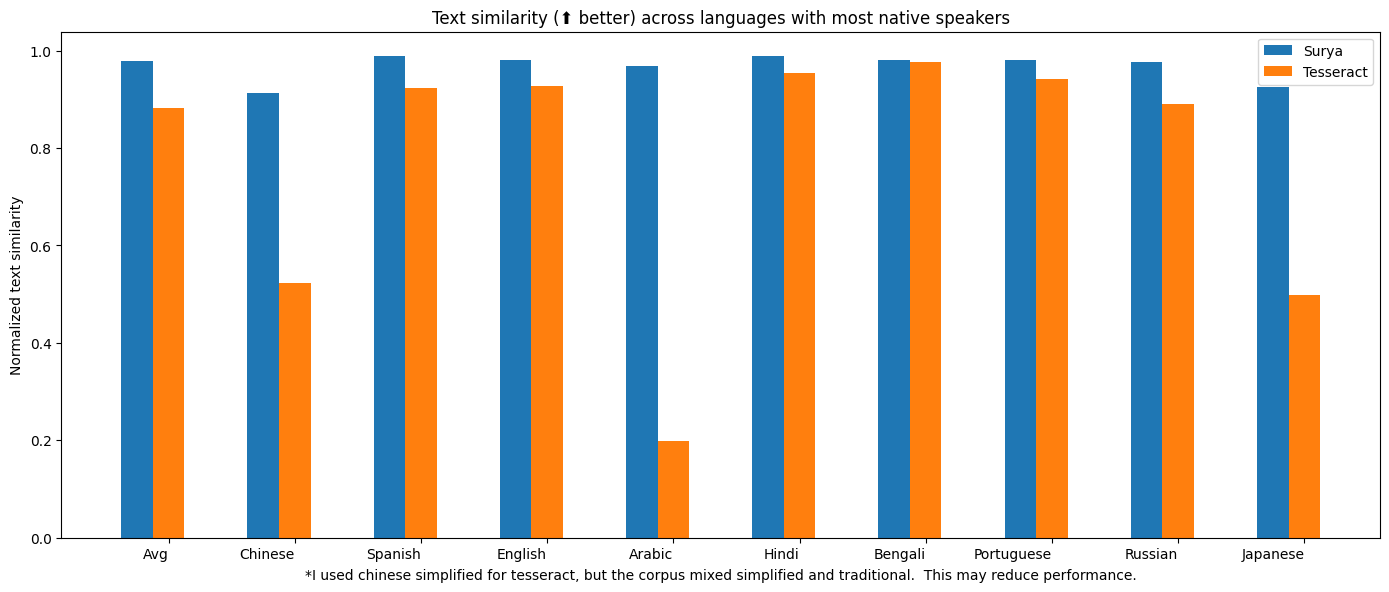
| Model | Time per page (s) | Avg similarity (⬆) |
|---|---|---|
| surya | .62 | 0.97 |
| tesseract | .45 | 0.88 |
Tesseract is CPU-based, and surya is CPU or GPU. I tried to cost-match the resources used, so I used a 1xA6000 (48GB VRAM) for surya, and 28 CPU cores for Tesseract (same price on Lambda Labs/DigitalOcean).
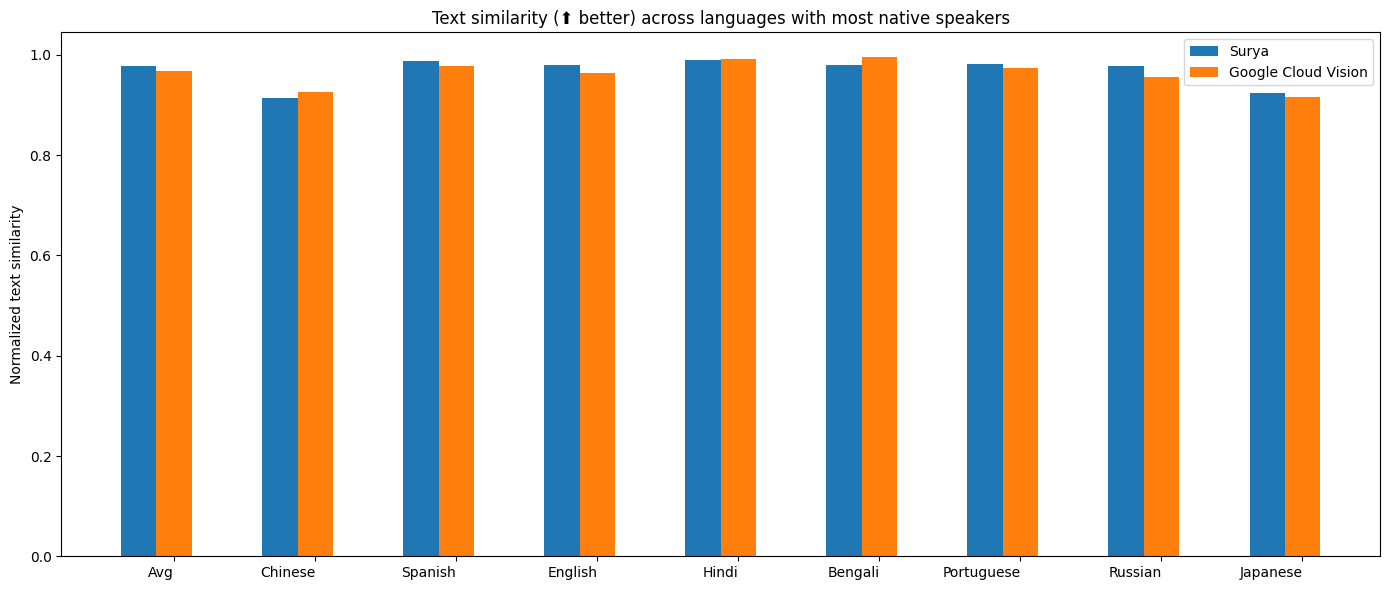
Google Cloud Vision
I benchmarked OCR against Google Cloud vision since it has similar language coverage to Surya.
Methodology
I measured normalized sentence similarity (0-1, higher is better) based on a set of real-world and synthetic pdfs. I sampled PDFs from common crawl, then filtered out the ones with bad OCR. I couldn't find PDFs for some languages, so I also generated simple synthetic PDFs for those.
I used the reference line bboxes from the PDFs with both tesseract and surya, to just evaluate the OCR quality.
For Google Cloud, I aligned the output from Google Cloud with the ground truth. I had to skip RTL languages since they didn't align well.
Text line detection
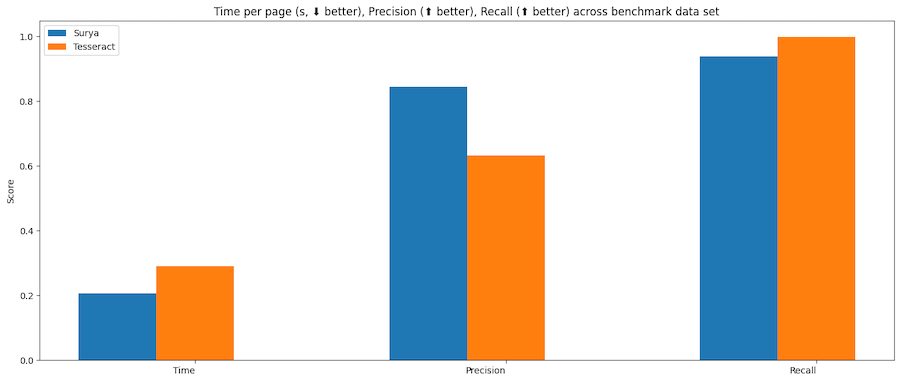
| Model | Time (s) | Time per page (s) | precision | recall |
|---|---|---|---|---|
| surya | 47.2285 | 0.094452 | 0.835857 | 0.960807 |
| tesseract | 74.4546 | 0.290838 | 0.631498 | 0.997694 |
Tesseract is CPU-based, and surya is CPU or GPU. I ran the benchmarks on a system with an A10 GPU, and a 32 core CPU. This was the resource usage:
- tesseract - 32 CPU cores, or 8 workers using 4 cores each
- surya - 36 batch size, for 16GB VRAM usage
Methodology
Surya predicts line-level bboxes, while tesseract and others predict word-level or character-level. It's hard to find 100% correct datasets with line-level annotations. Merging bboxes can be noisy, so I chose not to use IoU as the metric for evaluation.
I instead used coverage, which calculates:
- Precision - how well the predicted bboxes cover ground truth bboxes
- Recall - how well ground truth bboxes cover predicted bboxes
First calculate coverage for each bbox, then add a small penalty for double coverage, since we want the detection to have non-overlapping bboxes. Anything with a coverage of 0.5 or higher is considered a match.
Then we calculate precision and recall for the whole dataset.
Layout analysis
| Layout Type | precision | recall |
|---|---|---|
| Image | 0.91265 | 0.93976 |
| List | 0.80849 | 0.86792 |
| Table | 0.84957 | 0.96104 |
| Text | 0.93019 | 0.94571 |
| Title | 0.92102 | 0.95404 |
Time per image - .13 seconds on GPU (A10).
Methodology
I benchmarked the layout analysis on Publaynet, which was not in the training data. I had to align publaynet labels with the surya layout labels. I was then able to find coverage for each layout type:
- Precision - how well the predicted bboxes cover ground truth bboxes
- Recall - how well ground truth bboxes cover predicted bboxes
Reading Order
88% mean accuracy, and .4 seconds per image on an A10 GPU. See methodology for notes - this benchmark is not perfect measure of accuracy, and is more useful as a sanity check.
Methodology
I benchmarked the reading order on the layout dataset from here, which was not in the training data. Unfortunately, this dataset is fairly noisy, and not all the labels are correct. It was very hard to find a dataset annotated with reading order and also layout information. I wanted to avoid using a cloud service for the ground truth.
The accuracy is computed by finding if each pair of layout boxes is in the correct order, then taking the % that are correct.
Table Recognition
| Model | Row Intersection | Col Intersection | Time Per Image |
|---|---|---|---|
| Surya | 1 | 0.98625 | 0.30202 |
| Table transformer | 0.84 | 0.86857 | 0.08082 |
Higher is better for intersection, which the percentage of the actual row/column overlapped by the predictions. This benchmark is mostly a sanity check - there is a more rigorous one in marker
Methodology
The benchmark uses a subset of Fintabnet from IBM. It has labeled rows and columns. After table recognition is run, the predicted rows and columns are compared to the ground truth. There is an additional penalty for predicting too many or too few rows/columns.
LaTeX OCR
| Method | edit ⬇ | time taken (s) ⬇ |
|---|---|---|
| texify | 0.122617 | 35.6345 |
This inferences texify on a ground truth set of LaTeX, then does edit distance. This is a bit noisy, since 2 LaTeX strings that render the same can have different symbols in them.
Running your own benchmarks
You can benchmark the performance of surya on your machine.
- Follow the manual install instructions above.
poetry install --group dev- installs dev dependencies
Text line detection
This will evaluate tesseract and surya for text line detection across a randomly sampled set of images from doclaynet.
python benchmark/detection.py --max_rows 256
--max_rowscontrols how many images to process for the benchmark--debugwill render images and detected bboxes--pdf_pathwill let you specify a pdf to benchmark instead of the default data--results_dirwill let you specify a directory to save results to instead of the default one
Text recognition
This will evaluate surya and optionally tesseract on multilingual pdfs from common crawl (with synthetic data for missing languages).
python benchmark/recognition.py --tesseract
-
--max_rowscontrols how many images to process for the benchmark -
--debug 2will render images with detected text -
--results_dirwill let you specify a directory to save results to instead of the default one -
--tesseractwill run the benchmark with tesseract. You have to runsudo apt-get install tesseract-ocr-allto install all tesseract data, and setTESSDATA_PREFIXto the path to the tesseract data folder. -
Set
RECOGNITION_BATCH_SIZE=864to use the same batch size as the benchmark. -
Set
RECOGNITION_BENCH_DATASET_NAME=vikp/rec_bench_histto use the historical document data for benchmarking. This data comes from the tapuscorpus.
Layout analysis
This will evaluate surya on the publaynet dataset.
python benchmark/layout.py
--max_rowscontrols how many images to process for the benchmark--debugwill render images with detected text--results_dirwill let you specify a directory to save results to instead of the default one
Reading Order
python benchmark/ordering.py
--max_rowscontrols how many images to process for the benchmark--debugwill render images with detected text--results_dirwill let you specify a directory to save results to instead of the default one
Table Recognition
python benchmark/table_recognition.py --max_rows 1024 --tatr
--max_rowscontrols how many images to process for the benchmark--debugwill render images with detected text--results_dirwill let you specify a directory to save results to instead of the default one--tatrspecifies whether to also run table transformer
LaTeX OCR
python benchmark/texify.py --max_rows 128
--max_rowscontrols how many images to process for the benchmark--results_dirwill let you specify a directory to save results to instead of the default one
Training
Text detection was trained on 4x A6000s for 3 days. It used a diverse set of images as training data. It was trained from scratch using a modified efficientvit architecture for semantic segmentation.
Text recognition was trained on 4x A6000s for 2 weeks. It was trained using a modified donut model (GQA, MoE layer, UTF-16 decoding, layer config changes).
Finetuning Surya OCR
You can now take Surya OCR further by training it on your own data with our finetuning script. It’s built on Hugging Face Trainer, and supports all the arguments that the huggingface trainer provides, and integrations like torchrun, or deepspeed.
To setup your dataset, follow the example dataset format here and provide the path to your own dataset when launching the training script.
# Tested on 1xH100 GPU
# Set --pretrained_checkpoint_path to load from a custom checkpoint, otherwise
# the default surya ocr weights will be loaded as the initialization
python surya/scripts/finetune_ocr.py \
  --output_dir $OUTPUT_DIR \
  --dataset_name datalab-to/ocr_finetune_example \
  --per_device_train_batch_size 64 \
  --gradient_checkpointing true \
  --max_sequence_length 1024
This is a minimal training script to get you started finetuning Surya. Our internal training stack includes character bounding box finetuning, sliding window attention with specialized attention masks, custom kernels, augmentations, and other optimizations that can push OCR accuracy well beyond standard finetuning. If you want to get the most out of your data, reach us at [email protected]!
Thanks
This work would not have been possible without amazing open source AI work:
- Segformer from NVIDIA
- EfficientViT from MIT
- timm from Ross Wightman
- Donut from Naver
- transformers from huggingface
- CRAFT, a great scene text detection model
Thank you to everyone who makes open source AI possible.
Citation
If you use surya (or the associated models) in your work or research, please consider citing us using the following BibTeX entry:
@misc{paruchuri2025surya,
  author       = {Vikas Paruchuri and Datalab Team},
  title        = {Surya: A lightweight document OCR and analysis toolkit},
  year         = {2025},
  howpublished = {\url{https://github.com/VikParuchuri/surya}},
  note         = {GitHub repository},
}
Discover Repositories
Search across tracked repositories by name or description