
clockworklabs/SpacetimeDB
Development at the speed of light
Build with Backblaze B2
SDKs, agent skills, IDE extensions, and reference pipelines from Backblaze Labs. All open source.
Loading star history...
Use Cases & Benefits
- Provides a high-performance relational database that integrates application logic as modules executed inside the database itself.
- Eliminates the need for separate servers or microservices by allowing clients to connect directly and run application logic in Rust within the database.
- Use for building real-time MMORPG backends where game state and logic run entirely inside the database for minimal latency.
- Use for developing chat or collaboration tools that require fast, in-memory state management with persistent recovery via write-ahead logs.
- Use for creating web applications that benefit from a unified Rust codebase and simplified deployment without traditional infrastructure or DevOps overhead.
About SpacetimeDB




Development at the speed of light.











What is SpacetimeDB?
You can think of SpacetimeDB as both a database and server combined into one.
It is a relational database system that lets you upload your application logic directly into the database by way of fancy stored procedures called "modules."
Instead of deploying a web or game server that sits in between your clients and your database, your clients connect directly to the database and execute your application logic inside the database itself. You can write all of your permission and authorization logic right inside your module just as you would in a normal server.
This means that you can write your entire application in a single language, Rust, and deploy it as a single binary. No more microservices, no more containers, no more Kubernetes, no more Docker, no more VMs, no more DevOps, no more infrastructure, no more ops, no more servers.
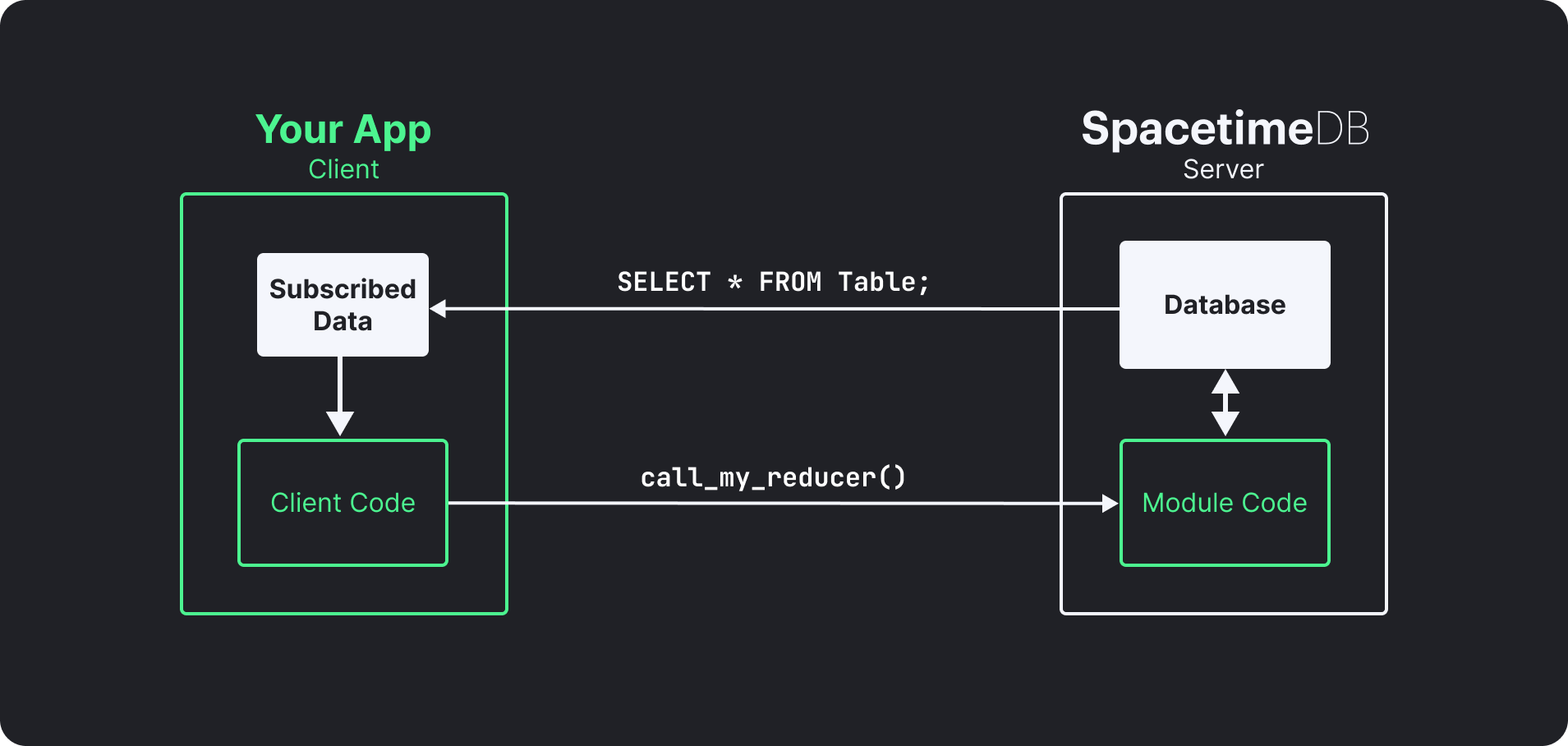
SpacetimeDB application architecture
(elements in white are provided by SpacetimeDB)
It's actually similar to the idea of smart contracts, except that SpacetimeDB is a database, has nothing to do with blockchain, and is orders of magnitude faster than any smart contract system.
So fast, in fact, that the entire backend of our MMORPG BitCraft Online is just a SpacetimeDB module. We don't have any other servers or services running, which means that everything in the game, all of the chat messages, items, resources, terrain, and even the locations of the players are stored and processed by the database before being synchronized out to all of the clients in real-time.
SpacetimeDB is optimized for maximum speed and minimum latency rather than batch processing or OLAP workloads. It is designed to be used for real-time applications like games, chat, and collaboration tools.
This speed and latency is achieved by holding all of application state in memory, while persisting the data in a write-ahead-log (WAL) which is used to recover application state.
Installation
You can run SpacetimeDB as a standalone database server via the spacetime CLI tool.
Install instructions for supported platforms are outlined below.
The same install instructions can be found on our website at https://spacetimedb.com/install.
Install on macOS
Installing on macOS is as simple as running our install script. After that you can use the spacetime command to manage versions.
curl -sSf https://install.spacetimedb.com | sh
Install on Linux
Installing on Linux is as simple as running our install script. After that you can use the spacetime command to manage versions.
curl -sSf https://install.spacetimedb.com | sh
Install on Windows
Installing on Windows is as simple as pasting the snippet below into PowerShell. If you would like to use WSL instead, please follow the Linux install instructions.
iwr https://windows.spacetimedb.com -useb | iex
Installing from Source
A quick note on installing from source: we recommend that you don't install from source unless there is a feature that is available in master that hasn't been released yet, otherwise follow the official installation instructions.
MacOS + Linux
Installing on macOS + Linux is pretty straightforward. First we are going to build all of the binaries that we need:
# Install rustup, you can skip this step if you have cargo and the wasm32-unknown-unknown target already installed.
curl https://sh.rustup.rs -sSf | sh
# Clone SpacetimeDB
git clone https://github.com/clockworklabs/SpacetimeDB
# Build and install the CLI
cd SpacetimeDB
cargo build --locked --release -p spacetimedb-standalone -p spacetimedb-update -p spacetimedb-cli

# Create directories
mkdir -p ~/.local/bin
export STDB_VERSION="$(./target/release/spacetimedb-cli --version | sed -n 's/.*spacetimedb tool version \([0-9.]*\);.*/\1/p')"
mkdir -p ~/.local/share/spacetime/bin/$STDB_VERSION

# Install the update binary
cp target/release/spacetimedb-update ~/.local/bin/spacetime
cp target/release/spacetimedb-cli ~/.local/share/spacetime/bin/$STDB_VERSION
cp target/release/spacetimedb-standalone ~/.local/share/spacetime/bin/$STDB_VERSION
At this stage you'll need to add ~/.local/bin to your path if you haven't already.
# Please add the following line to your shell configuration and open a new shell session:
export PATH="$HOME/.local/bin:$PATH"
Then finally set your SpacetimeDB version:
# Then, in a new shell, set the current version:
spacetime version use $STDB_VERSION

# If STDB_VERSION is not set anymore then you can use the following command to list your versions:
spacetime version list
You can verify that the correct version has been installed via spacetime --version.
Windows
Building on windows is a bit more complicated. You'll need a slightly different version of perl compared to what comes pre-bundled in most Windows terminals. We recommend Strawberry Perl. You may also need access to an openssl binary which actually comes pre-installed with Git for Windows. Also, you'll need to install rustup for Windows.
In a Git for Windows shell you should have something that looks like this:
$ which perl
/c/Strawberry/perl/bin/perl
$ which openssl
/mingw64/bin/openssl
$ which cargo
/c/Users/<user>/.cargo/bin/cargo
If that looks correct then you're ready to proceed!
# Clone SpacetimeDB
git clone https://github.com/clockworklabs/SpacetimeDB

# Build and install the CLI
cd SpacetimeDB
cargo build --locked --release -p spacetimedb-standalone -p spacetimedb-update -p spacetimedb-cli

# Create directories
$stdbDir = "$HOME\AppData\Local\SpacetimeDB"
$stdbVersion = & ".\target\release\spacetimedb-cli" --version | Select-String -Pattern 'spacetimedb tool version ([0-9.]+);' | ForEach-Object { $_.Matches.Groups[1].Value }
New-Item -ItemType Directory -Path "$stdbDir\bin\$stdbVersion" -Force | Out-Null

# Install the update binary
Copy-Item "target\release\spacetimedb-update.exe" "$stdbDir\spacetime.exe"
Copy-Item "target\release\spacetimedb-cli.exe" "$stdbDir\bin\$stdbVersion\"
Copy-Item "target\release\spacetimedb-standalone.exe" "$stdbDir\bin\$stdbVersion\"
Now add the directory we just created to your path. We recommend adding it to the system path because then it will be available to all of your applications (including Unity3D). After you do this, restart your shell!
%USERPROFILE%\AppData\Local\SpacetimeDB
Then finally, open a new shell and use the installed SpacetimeDB version:
spacetime version use $stdbVersion

# If stdbVersion is no longer set, list versions using the following command:
spacetime version list
You can verify that the correct version has been installed via spacetime --version.
If you're using Git for Windows you can follow these instructions instead:
# Clone SpacetimeDB
git clone https://github.com/clockworklabs/SpacetimeDB
# Build and install the CLI
cd SpacetimeDB
# Build the CLI binaries - this takes a while on windows so go grab a coffee :)
cargo build --locked --release -p spacetimedb-standalone -p spacetimedb-update -p spacetimedb-cli

# Create directories
export STDB_VERSION="$(./target/release/spacetimedb-cli --version | sed -n 's/.*spacetimedb tool version \([0-9.]*\);.*/\1/p')"
mkdir -p ~/AppData/Local/SpacetimeDB/bin/$STDB_VERSION

# Install the update binary
cp target/release/spacetimedb-update ~/AppData/Local/SpacetimeDB/spacetime
cp target/release/spacetimedb-cli ~/AppData/Local/SpacetimeDB/bin/$STDB_VERSION
cp target/release/spacetimedb-standalone ~/AppData/Local/SpacetimeDB/bin/$STDB_VERSION

# Now add the directory we just created to your path. We recommend adding it to the system path because then it will be available to all of your applications (including Unity3D). After you do this, restart your shell!
# %USERPROFILE%\AppData\Local\SpacetimeDB

# Set the current version
spacetime version use $STDB_VERSION
You can verify that the correct version has been installed via spacetime --version.
Running with Docker
If you prefer to run Spacetime in a container, you can use the following command to start a new instance.
docker run --rm --pull always -p 3000:3000 clockworklabs/spacetime start
Documentation
For more information about SpacetimeDB, getting started guides, game development guides, and reference material please see our documentation.
Getting Started
We've prepared several getting started guides in each of our supported languages to help you get up and running with SpacetimeDB as quickly as possible. You can find them on our docs page.
In summary there are only 4 steps to getting started with SpacetimeDB.
- Install the
spacetimeCLI tool. - Start a SpacetimeDB standalone node with
spacetime start. - Write and upload a module in one of our supported module languages.
- Connect to the database with one of our client libraries.
You can see a summary of the supported languages below with a link to the getting started guide for each.
Language Support
You can write SpacetimeDB modules in several popular languages, with more to come in the future!
Serverside Libraries
Client Libraries
License
SpacetimeDB is licensed under the BSL 1.1 license. This is not an open source or free software license, however, it converts to the AGPL v3.0 license with a linking exception after a few years.
Note that the AGPL v3.0 does not typically include a linking exception. We have added a custom linking exception to the AGPL license for SpacetimeDB. Our motivation for choosing a free software license is to ensure that contributions made to SpacetimeDB are propagated back to the community. We are expressly not interested in forcing users of SpacetimeDB to open source their own code if they link with SpacetimeDB, so we needed to include a linking exception.
Discover Repositories
Search across tracked repositories by name or description