
backblaze-labs/genblaze-gen-media-multi-provider-sample
Build with Backblaze B2
SDKs, agent skills, IDE extensions, and reference pipelines from Backblaze Labs. All open source.
Loading star history...
Use Cases & Benefits
- Builds an end-to-end generative media pipeline that converts a single text prompt into a narrated, scored, captioned MP4 video using multiple AI providers.
- Eliminates the need for custom integration code by orchestrating authentication, retries, polling, error handling, and storage across five AI services with a single pipeline call.
- Use for creating AI-generated explainer videos by combining text-to-storyboard, image generation, video animation, text-to-speech, and music scoring in one workflow.
- Use for developers needing a scalable multi-provider AI media pipeline with built-in asset storage on Backblaze B2 without direct SDK calls like boto3.
- Use for teams wanting live progress streaming and per-scene media updates with optional scene prompt refinement before final video composition.
About genblaze-gen-media-multi-provider-sample
genblaze-gen-media-multi-provider-sample
One prompt → narrated, scored, captioned MP4. OpenAI + Google + NVIDIA + Decart + GMICloud, orchestrated by Genblaze. Backblaze B2 is the sole asset store; the sample contains zero direct
boto3calls.
Building a multi-provider generative-media pipeline used to mean writing
your own glue between five different AI providers — auth, retries, polling,
error handling, asset storage, and lineage tracking, all hand-rolled per
vendor. This sample shows how Genblaze collapses that work into
a one-line .step() call: a developer types a single sentence and the
library orchestrates an entire AI explainer-video workflow end-to-end —
text-to-storyboard planning (OpenAI gpt-4.1-nano),
keyframe image generation (Google Imagen 4), image-to-video animation
(Decart Lucy / GMICloud Kling), text-to-speech narration (NVIDIA Magpie
TTS), and AI music scoring (GMICloud MiniMax) — and stitches them into a
final captioned MP4 with ffmpeg composition. Every intermediate artifact and
the composed video land in Backblaze B2 via genblaze-s3; the sample source
contains zero direct boto3 calls. It's a reference for what production
multi-provider generative-AI pipelines look like when the orchestration layer
does its job — no per-provider auth boilerplate, no retry loops, no polling
glue, no bespoke storage scaffolding.
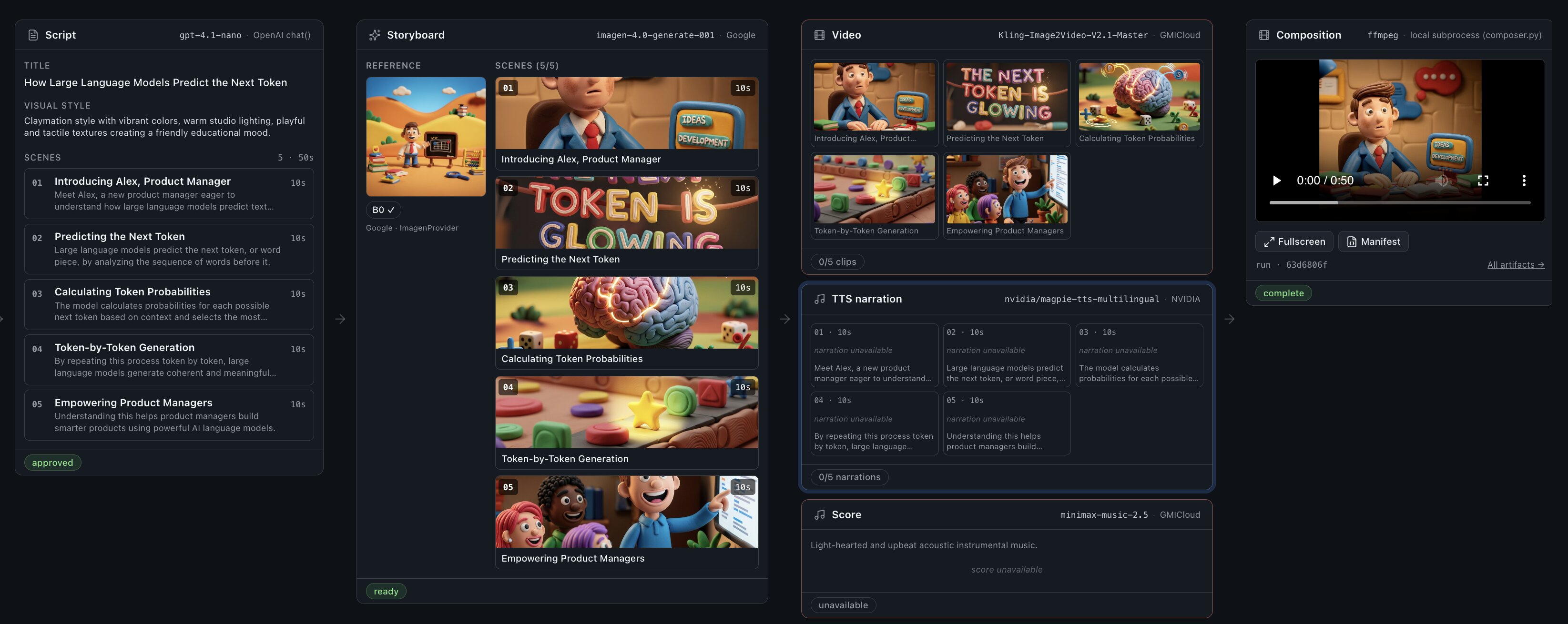
Pipeline stages
The sample wires five generative-AI providers behind one Genblaze pipeline, with Backblaze B2 as the durable asset store:
| Stage | Genblaze surface | Model default | Output |
|---|---|---|---|
| A — plan | genblaze_openai.chat() (function) | gpt-4.1-nano | StoryboardSpec JSON |
| B0/B1 — image | ImagenProvider (.step()) | imagen-4.0-generate-001 | reference + 1 PNG/scene |
| B2 — video | GMICloudVideoProvider (.step()) | Kling-Image2Video-V2.1-Master | one MP4 per scene |
| B2 — TTS | NvidiaAudioProvider (.step()) | nvidia/magpie-tts-multilingual | one WAV per scene |
| B2 — music | GMICloudAudioProvider (.step()) | minimax-music-2.5 | one WAV for the run |
| C — compose | (ffmpeg fallback) | — | final MP4 → B2 |
Stages B1 and B2 are linked Pipelines sharing one slug
(genblaze-gen-media-multi-provider-sample); B2's Manifest records its
parent_run_id so the cross-stage lineage is durable in B2.
Note on Stage A.
genblaze-openai0.3.0 shipschat()as a standalone function (not aBaseProvider), so the storyboard step cannot ridePipeline.step(). We callchat(..., response_format=StoryboardSpec)directly and persist the resulting JSON to B2 by hand. Stages B1 and B2 remain proper Pipelines. The function-vs-class asymmetry is filed as Genblaze SDK feedback — seedocs/features/prompt-to-storyboard.md.
Quickstart
1. Provision accounts
- Backblaze B2 — create a bucket + Application Key
(signup). Region
format:
us-west-004/eu-central-003/ etc. - OpenAI — API key for
chat()storyboard planning (Stage A) (platform.openai.com). - Google — API key for
ImagenProviderreference + keyframe images (Stages B0/B1) (aistudio.google.com/apikey). - NVIDIA NIM — API key for TTS (build.nvidia.com).
- Decart — API key for video (decart.ai).
- GMICloud — API key for music (gmicloud.ai).
2. Install ffmpeg
The composer shells out to ffmpeg; install it before running:
# macOS
brew install ffmpeg
# Debian / Ubuntu
sudo apt-get update && sudo apt-get install -y ffmpeg
See infra/README.md for B2 bucket + lifecycle suggestions.
3. Configure
cp .env.example .env
# Fill in B2_* + provider keys. Replace <region> in B2_REGION with the
# region the bucket was created in (e.g. us-west-004). genblaze-s3
# derives the S3 endpoint from the region — no B2_ENDPOINT needed.
4. Install + run
From the sample root:
pnpm setup    # one-shot: pnpm install + creates services/api/.venv and pip-installs requirements.txt
pnpm dev      # starts FastAPI (:8000) and Next.js (:3000) together via concurrently
That's it — no separate terminals. Output is prefixed [web] / [api] so
you can follow both streams in one log. Ctrl+C stops both.
Re-runs after the first time skip setup and just pnpm dev. Other
scripts: pnpm test, pnpm lint, pnpm typecheck, pnpm check:structure.
Open http://localhost:3000, type one sentence, click Generate explainer. The storyboard renders inline; expand "Review & refine" to edit scenes before kicking off media generation. Live pipeline events stream as the run progresses, and per-scene keyframes / clips / narrations appear in the scene strip as they land.
Architecture
apps/web (Next.js, App Router, React 19)
    │
    │  /api/proxy/...
    ▼
services/api (FastAPI)
    │
    │  app/main.py    ──► app/repo/pipelines.py  ──►  genblaze-{core,s3,openai,google,nvidia,decart,gmicloud}
    │                     app/repo/composer.py   ──►  system ffmpeg (only non-Genblaze adapter)
    │
    ▼
Backblaze B2 (bucket: $B2_BUCKET_NAME, prefix: explainers/<run-id>/...)
See ARCHITECTURE.md for the layer diagram, Stage A/B1/B2/C
handoffs, ethos constraints, and the SSE wire format.
Repository layout
genblaze-gen-media-multi-provider-sample/
├── apps/web/                  # Next.js single-page UI
├── services/api/              # FastAPI + Genblaze (boto3 forbidden)
│   ├── app/repo/pipelines.py  # The ONLY file that imports genblaze provider classes + chat()
│   ├── app/repo/composer.py   # ffmpeg composer (only non-Genblaze media surface)
│   └── tests/                 # Structural + smoke + composer tests
├── docs/                      # Feature docs + workflows
├── infra/                     # B2 bucket + ffmpeg setup notes
└── .env.example               # Parent-standard env var names
Key features
- One prompt → one MP4. Default path is a single textarea and one CTA.
- Mixed Genblaze surfaces, one delivery. Stage A is
chat()(function), Stages B1/B2 arePipeline.step()(class), Stage C is ffmpeg. The pipeline layer hides the asymmetry from the API surface. - Structured planning via
response_format=StoryboardSpec. The storyboard JSON schema is enforced upstream by OpenAI. - Per-scene fan-out at
max_concurrency=3. Genblaze handles the parallelism in Stages B1 and B2; the sample provides no executor. - Live SSE pipeline progress + per-scene strip. Stage B1 + B2 events
flow through the FastAPI proxy unmodified; keyframes / clips /
narrations appear in
SceneStripas soon as they land in B2. - Optional progressive guidance. Edit any scene's prompts before media generation runs — opt-in via a disclosure panel.
- Provenance for free. Stages B1 + B2 share one slug; B2's Manifest
records
parent_run_idto capture lineage. The final MP4 has the Stage B2 Manifest embedded viaMp4Handler.
Doc index
AGENTS.md— hard rules for AI assistants working on this app.ARCHITECTURE.md— layers, ethos constraints, SSE wire format.docs/app-workflows.md— one-prompt-to-MP4 sequence diagram.docs/features/prompt-to-storyboard.md— thechat(response_format=…)idiom.docs/features/media-generation.md— keyframes, image→video, TTS, music.docs/features/composition.md— ffmpeg fallback + SDK gap.docs/features/progressive-guidance.md— optional refine flow.
Discover Repositories
Search across tracked repositories by name or description