
ai-shifu/ChatALL
Concurrently chat with ChatGPT, Bing Chat, Bard, Alpaca, Vicuna, Claude, ChatGLM, MOSS, 讯飞星火, 文心一言 and more, discover the best answers
Build with Backblaze B2
SDKs, agent skills, IDE extensions, and reference pipelines from Backblaze Labs. All open source.
Loading star history...
Use Cases & Benefits
- Enables concurrent chatting with multiple AI bots to compare and discover the best responses in one interface.
- Offers simultaneous access to diverse AI models, saving time and providing a comprehensive comparison of answers.
- Use for researchers comparing strengths and weaknesses of various large language models across different tasks.
- Use for developers debugging prompts and evaluating foundation models quickly in a multi-bot environment.
- Use for AI enthusiasts seeking the best creative or informative responses by querying multiple chatbots at once.
About ChatALL

Chat with ALL AI Bots Concurrently, Discover the Best
Deutsch | English | Español | Français | Italian | 日本語 | 한국어 | Русский | Tiếng Việt | 简体中文

Screenshots
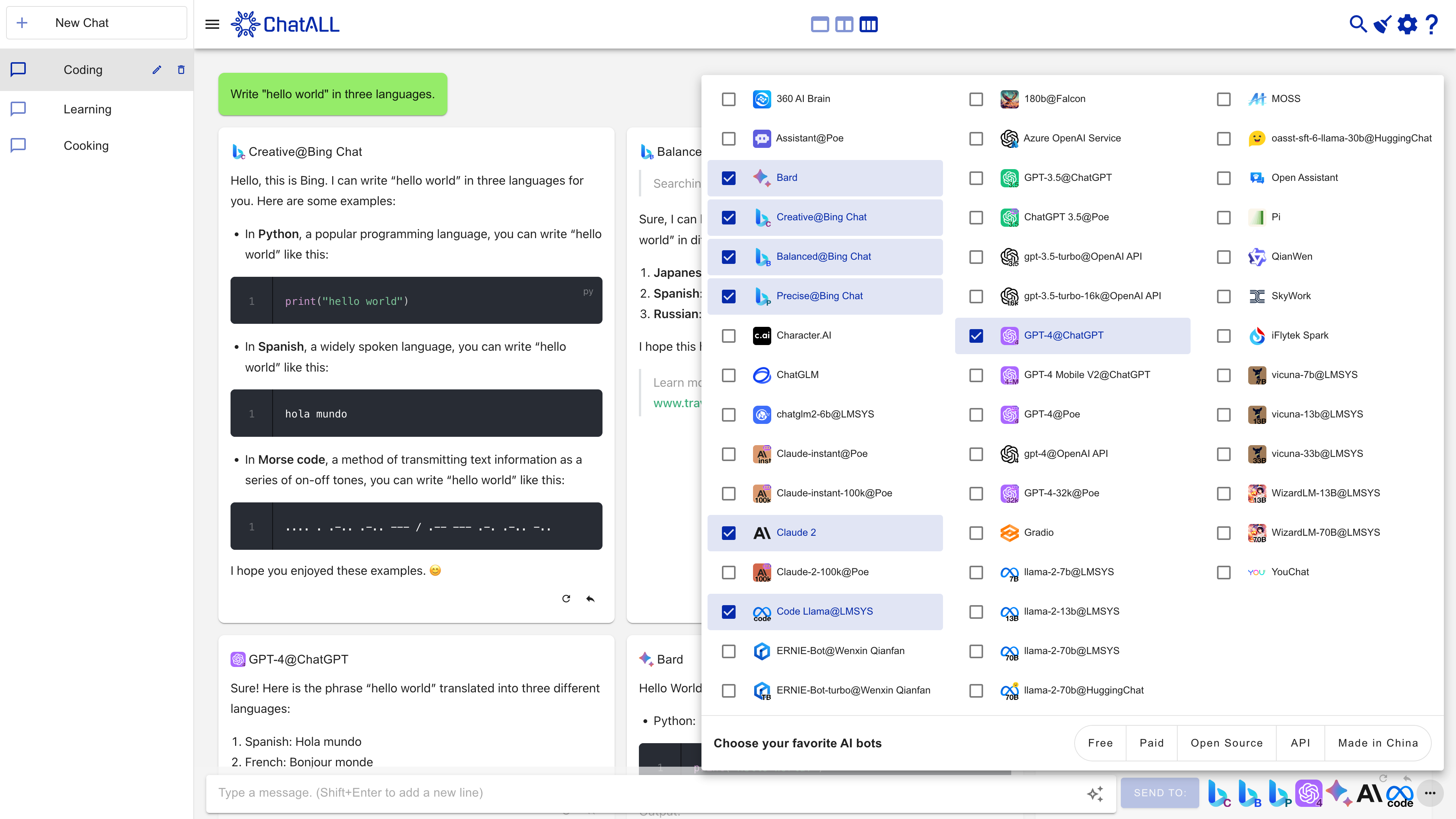
Features
Large Language Models (LLMs) based AI bots are amazing. However, their behavior can be random and different bots excel at different tasks. If you want the best experience, don't try them one by one. ChatALL (Chinese name: 齐叨) can send prompt to several AI bots concurrently, help you to discover the best results. All you need to do is download, install and ask.
Is this you?
Typical users of ChatALL are:
- 🤠Gurus of LLMs, who want to find the best answers or creations from LLMs.
- 🤓Researchers of LLMs, who want to intuitively compare the strengths and weaknesses of various LLMs in different fields.
- 😎Developers of LLM applications, who want to quickly debug prompts and find the best-performing foundation models.
Supported bots
| AI Bots | Web Access | API | Notes |
|---|---|---|---|
| 360 AI Brain | Yes | No API | |
| Baidu ERNIE | No | Yes | |
| Character.AI | Yes | No API | |
| ChatGLM2 6B & 130B | Yes | No API | No Login required |
| ChatGPT | Yes | Yes | Web Browsing, Azure OpenAI service included |
| Claude | Yes | Yes | |
| Code Llama | Yes | No API | |
| Cohere Aya 23 | No | Yes | |
| Cohere Command R Models | No | Yes | |
| Copilot | Yes | No API | |
| Dedao Learning Assistant | Coming soon | No API | |
| Falcon 180B | Yes | No API | |
| Gemini | Yes | Yes | |
| Gemma 2B & 7B | Yes | No API | |
| Gradio | Yes | No API | For Hugging Face space/self-deployed models |
| Groq Cloud | No | Yes | |
| HuggingChat | Yes | No API | |
| iFLYTEK SPARK | Yes | Coming soon | |
| Kimi | Yes | No API | |
| Llama 2 13B & 70B | Yes | No API | |
| MOSS | Yes | No API | |
| Perplexity | Yes | No API | |
| Phind | Yes | No API | |
| Pi | Yes | No API | |
| Poe | Yes | Coming soon | |
| SkyWork | Yes | Coming soon | |
| Tongyi Qianwen | Yes | Coming soon | |
| Vicuna 13B & 33B | Yes | No API | No Login required |
| WizardLM 70B | Yes | No API | |
| xAI Grok | No | Yes | |
| YouChat | Yes | No API | |
| You | Yes | No API | |
| Zephyr | Yes | No API |
More is coming. Upvote your favorite bots in these issues.
Note on Web-connected Bot Reliability
Web-connected AI bots (those marked with "Web Access") are inherently less reliable and frequently face stability issues, as service providers regularly update their web interfaces and security measures. These web-based connections rely on reverse engineering and are difficult to maintain, often breaking unexpectedly. For a dependable experience, we strongly recommend using bots that offer API access whenever possible.
Other features
- Quick-prompt mode: send the next prompt without waiting for the previous request to complete
- Save chat history locally, protect your privacy
- Highlight the response you like, delete the bad
- Enable/disable any bots at any time
- Switch between one, two, or three-column view
- Auto update to the latest version
- Dark mode (contributed by @tanchekwei)
- Short keys. Press Ctrl + / to know all of them (contributed by @tanchekwei)
- Multiple chats (contributed by @tanchekwei)
- Proxy setting (contributed by @msaong)
- Prompt management (contributed by @tanchekwei)
- Supports multiple languages (Chinese, English, German, French, Russian, Vietnamese, Korean, Japanese, Spanish, Italian)
- Supports Windows, macOS and Linux
Planned features:
You are welcome to contribute to these features.
- Deploy front-end to GitHub Pages
Privacy
All chat history, settings and login data are saved locally on your computer.
ChatALL collects anonymous usage data to help us improve the product. Including:
- Which AI bots are prompted and how long the prompt is. Not including the prompt content.
- How long the response is, and which response is deleted/highlighted. Not including the response content.
Prerequisites
ChatALL is a client, not a proxy. Therefore, you must:
- Have working accounts and/or API tokens for the bots.
- Have reliable network connections to the bots.
Download / Install
Download from https://github.com/ai-shifu/ChatALL/releases
On Windows
Just download the *-win.exe file and proceed with the setup.
On macOS
For Apple Silicon Mac (M1, M2 CPU), download the *-mac-arm64.dmg file.
For other Macs, download *-mac-x64.dmg file.
If you are using Homebrew, you can also install it with:
brew install --cask chatall
On Linux
Debian-based Distributions: Download the .deb file, double click it and install the software. Arch-based Distributions: You can clone ChatALL from the AUR here. You can install it manually or using an AUR helper like yay or paru. Other Distributions: Download the .AppImage file, make it executable, and enjoy the click-to-run experience. You can also use AppimageLauncher.
Troubleshooting
If you encounter any problems while using ChatALL, you can try the following methods to resolve them:
- Refresh - press Ctrl + R or ⌘ + R.
- Restart - exit ChatALL and run it again.
- Re-login - click the settings button in the upper right corner, then click the corresponding login/logout link to relogin the website.
- Create a new chat - click the
New Chatbutton and send prompt again.
If none of the above methods work, you can try resetting ChatALL. Note that this will delete all your settings and message history.
You can reset ChatALL by deleting the following directories:
- Windows:
C:\Users\<user>\AppData\Roaming\chatall\ - Linux:
/home/<user>/.config/chatall/ - macOS:
/Users/<user>/Library/Application Support/chatall/
If the problem persists, please submit an issue.
For developers
Contribute a Bot
The guide may help you.
Run
npm install
npm run electron:serve
Build
Build for your current platform:
npm run electron:build
Build for all platforms:
npm run electron:build -- -wml --x64 --arm64
Credits
Contributors
Others
- GPT-4 contributed much of the code
- ChatGPT, Copilot and Google provide many solutions (ranked in order)
- Inspired by ChatHub. Respect!
Sponsor
If you like this project, please consider:

Discover Repositories
Search across tracked repositories by name or description