
ahmetb/kubectx
Faster way to switch between clusters and namespaces in kubectl

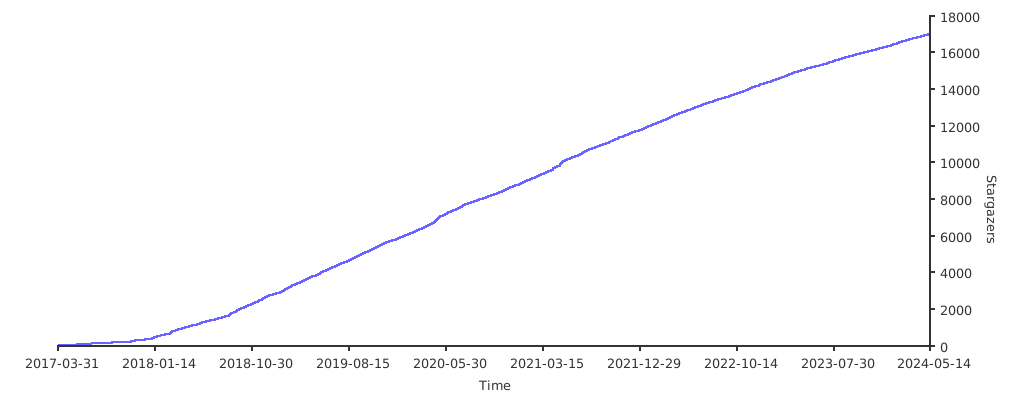
Loading star history...
Health Score
25.49
Weekly Growth
+0
+0.0% this week
Contributors
1
Total contributors
Open Issues
36
Generated Insights
About kubectx
kubectx + kubens: Power tools for kubectl



/badge.svg)
This repository provides both kubectx and kubens tools.
Install →
What are kubectx and kubens?
kubectx is a tool to switch between contexts (clusters) on kubectl
faster, and launch readonly shells for each context.
kubens is a tool to switch between Kubernetes namespaces (and
configure them for kubectl) easily.
Here's a kubectx demo:

...and here's a kubens demo:

Usage
kubectx
Switch to another cluster that's in kubeconfig:
$ kubectx minikube
Switched to context "minikube".
Switch back to previous cluster:
$ kubectx -
Switched to context "oregon".
Start an isolated shell that only has a single context:
$ kubectx -s minikube
Start a read-only shell where write operations are blocked:
$ kubectx -r minikube
Rename context:
$ kubectx dublin=gke_ahmetb_europe-west1-b_dublin
Context "gke_ahmetb_europe-west1-b_dublin" renamed to "dublin".
kubens
Change the active namespace on kubectl:
$ kubens kube-system
Context "test" set.
Active namespace is "kube-system".
Go back to the previous namespace:
$ kubens -
Context "test" set.
Active namespace is "default".
Change the active namespace even if it doesn't exist:
$ kubens namespace-404 -f
Context "test" set.
Active namespace is "namespace-404".
If you have fzf installed, you can also
interactively select a context or cluster, or fuzzy-search by typing a few
characters. To learn more, read interactive mode →
Both kubectx and kubens support Tab completion on bash/zsh/fish
shells to help with long context names. You don't have to remember full context
names anymore.
Installation
| Package manager | Command |
|---|---|
| Homebrew (macOS & Linux) | brew install kubectx |
| MacPorts (macOS) | sudo port install kubectx |
| apt (Debian/Ubuntu) | sudo apt install kubectx |
| pacman (Arch Linux) | sudo pacman -S kubectx |
| Chocolatey (Windows) | choco install kubens kubectx |
| Scoop (Windows) | scoop bucket add main && scoop install main/kubens main/kubectx |
| winget (Windows) | winget install --id ahmetb.kubectx && winget install --id ahmetb.kubens |
| Krew (kubectl plugin) | kubectl krew install ctx && kubectl krew install ns |
Alternatively, download binaries from the Releases page → and add them to somewhere in your PATH.
Shell completion scripts
zsh (with antibody)
Add this line to your Plugins File (e.g.
~/.zsh_plugins.txt):
ahmetb/kubectx path:completion kind:fpath
Depending on your setup, you might or might not need to call compinit or
autoload -U compinit && compinit in your ~/.zshrc after you load the Plugins
file. If you use oh-my-zsh, load the
completions before you load oh-my-zsh because oh-my-zsh will call
compinit.
zsh (plain)
The completion scripts have to be in a path that belongs to $fpath. Either
link or copy them to an existing folder.
Example with oh-my-zsh:
mkdir -p ~/.oh-my-zsh/custom/completions
chmod -R 755 ~/.oh-my-zsh/custom/completions
ln -s /opt/kubectx/completion/_kubectx.zsh ~/.oh-my-zsh/custom/completions/_kubectx.zsh
ln -s /opt/kubectx/completion/_kubens.zsh ~/.oh-my-zsh/custom/completions/_kubens.zsh
echo "fpath=($ZSH/custom/completions $fpath)" >> ~/.zshrc
If completion doesn't work, add autoload -U compinit && compinit to your
.zshrc (similar to
zsh-completions).
If you are not using oh-my-zsh, you
could link to /usr/share/zsh/functions/Completion (might require sudo),
depending on the $fpath of your zsh installation.
In case of errors, calling compaudit might help.
bash
git clone https://github.com/ahmetb/kubectx.git ~/.kubectx
COMPDIR=$(pkg-config --variable=completionsdir bash-completion)
ln -sf ~/.kubectx/completion/kubens.bash $COMPDIR/kubens
ln -sf ~/.kubectx/completion/kubectx.bash $COMPDIR/kubectx
cat << EOF >> ~/.bashrc


#kubectx and kubens
export PATH=~/.kubectx:\$PATH
EOF
fish
mkdir -p ~/.config/fish/completions
ln -s /opt/kubectx/completion/kubectx.fish ~/.config/fish/completions/
ln -s /opt/kubectx/completion/kubens.fish ~/.config/fish/completions/
[!NOTE] Tip: Show context/namespace in your shell prompt with oh-my-posh or simply with kube-ps1.
Interactive mode
If you want kubectx and kubens commands to present you an interactive menu
with fuzzy searching, you just need to install
fzf in your $PATH.

Caveats:
- If you have
fzfinstalled, but want to opt out of using this feature, set the environment variableKUBECTX_IGNORE_FZF=1. - If you want to keep
fzfinteractive mode but need the default behavior of the command, you can do it by piping the output to another command (e.g.kubectx | cat).
Customizing colors
If you like to customize the colors indicating the current namespace or context,
set the environment variables KUBECTX_CURRENT_FGCOLOR and
KUBECTX_CURRENT_BGCOLOR (refer color codes
here):
export KUBECTX_CURRENT_FGCOLOR=$(tput setaf 6) # blue text
export KUBECTX_CURRENT_BGCOLOR=$(tput setab 7) # white background
Colors in the output can be disabled by setting the
NO_COLOR environment variable.
If you liked kubectx, you may like my
kubectl-aliases project, too. I
recommend pairing kubectx and kubens with fzf and
kube-ps1.
Stargazers over time
Discover Repositories
Search across tracked repositories by name or description